
DK6 Programming tool#
This example shows the basic operations with the SPSDK dk6prog CLI application.
DK6 Programming tool also known as DK6Prog is an alternative tool to “JN51xx Production Flash Programmer”. DK6Prog is part of the SPSDK and written in Python. DK6 is a name that was given to development kit for K32W, JN51xx and QN90xx devices. https://www.nxp.com/products/wireless/multiprotocol-mcus/advanced-development-kit-for-k32w061-and-jn5189-88:IOTZTB-DK006
DK6 development kit is utilizing FTDI chip for sending ISP sequence in GPIO bitbang mode.
NOTE: Before running this Notebook, please make sure to install DK6 support in SPSDK: pip install -e “.[dk6]”
Backends#
User might select between four backends that will be used for communication.
PYFTDI is a pure Python implementation of libFTDI. Default selection for Linux and macOS.
PYLIBFTDI is a Ctypes wrapper for libFTDI, which is an open source implementation of FTDI D2xx driver.
FTD2XX is a Ctypes wrapper for official FTDI D2XX library. Default selection for Windows.
PYSERIAL is meant for pure UART communication; bitbang mode is not supported.
Backends are selected with -b or –backend option.
1. Prerequisites#
SPSDK is needed with examples extension.
pip install spsdk[examples](Please refer to the installation documentation.)This example uses DK6 board
1.1 DK6 Board overview#
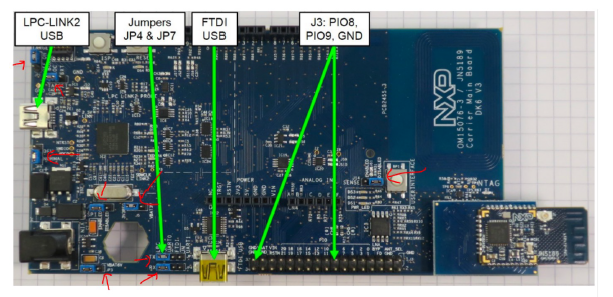
1.2 CLI operations#
Connect the USB cable to FTDI USB slot.
Connect JP7 and JP4 to UART0 - FTDI
Issue dk6prog listdev optionally with the -b option to select the backend
Get the DEVICE ID
Issue any command specifying DEVICE ID with -d parameter
%env JUPYTER_SPSDK=1
# Set a magic for command execution and echo
%alias execute echo %l && %l
%alias_magic ! execute

DEVICE_ID = "DN03TA7S"
NO_VERBOSE = ""
VERBOSE = "-v"
DEBUG = "-vv"
VERBOSITY = NO_VERBOSE

# Get the device ID
%! dk6prog $VERBOSITY listdev
env: JUPYTER_SPSDK=1
Created `%!` as an alias for `%execute`.
dk6prog listdev

This is an experimental utility. Use with caution!

List of available devices:
DEVICE ID: DN03TA7S, VID: 0x403, PID: 0x6015, Serial number: DN03TA7S, Description: DK6 Carrier Board, Address: 1, Backend: Backend.PYFTDI
2. ISP Protocol#
ISP sequence is controlled by FTDI CBUS pins in bitbang mode (or manually with ISP button)
Memory must be open in desired access mode before reading/writing
Default 115200 baud rate 8N1, no ABR (support up to 1 MBd)
ISP authentication (Signed unlock key n=288), Authenticated commands not implemented (SHA-256 + signature)
Encrypted transfer AES-CTR – not implemented
3. Memory operations#
What’s supported:
Read – read to file, stdout
Write – write to file, stdout
Erase – erase and check if memory is erased
Info – info about chip, memories, etc.
Command chaining – multiple commands might be chained
At first, let’s print the memory map of the device using the info command and see what’s available.
%! dk6prog -d $DEVICE_ID $VERBOSITY info
dk6prog -d 0 info

This is an experimental utility. Use with caution!

Chip ID: 0x88888888
ROM Version: 0x140000cc
MAC Address: FF:FF:FF:FF:FF:FF:FF:FF

Detected DEVICE: QN9090

  Memory   Memory ID   Base Address   Length    Sector Size   Memory Type   Access
----------------------------------------------------------------------------------------------
  FLASH    0           0x0            0x9de00   0x200         FLASH         All is available
  PSECT    1           0x0            0x1e0     0x10          FLASH         All is available
  pFLASH   2           0x0            0x1e0     0x10          FLASH         All is available
  Config   3           0x9fc00        0x200     0x200         FLASH         All is available
  EFUSE    4           0x0            0x80      0x2           EFUSE (OTP)   Write Enabled
  ROM      5           0x3000000      0x20000   0x1           ROM           Write Enabled
  RAM0     6           0x4000000      0x16000   0x1           RAM           Write Enabled
  RAM1     7           0x4020000      0x10000   0x1           RAM           Write Enabled
# read 8 bytes from flash at addr 0x96000
%! dk6prog $VERBOSITY -d $DEVICE_ID read 0x96000 8 FLASH
# read data to file
%! dk6prog $VERBOSITY -d $DEVICE_ID read -o data.bin 0x96000 8 FLASH
# erase 8 bytes from flash
%! dk6prog $VERBOSITY -d $DEVICE_ID erase 0x96000 8 FLASH
# writes data to flash, read it and erase them
%! dk6prog $VERBOSITY -d $DEVICE_ID write 0x96000 [[123456789abcdef0]] 8 FLASH
%! dk6prog $VERBOSITY -d $DEVICE_ID read 0x96000 8 FLASH
%! dk6prog $VERBOSITY -d $DEVICE_ID erase 0x96000 8 FLASH
dk6prog  -d 0 read 0x96000 8 FLASH

This is an experimental utility. Use with caution!

Reading memory
Read 8/8 bytes from 0x96000:0x96008 Memory ID: FLASH
de ad de ad de ad de ad
dk6prog  -d 0 read -o data.bin 0x96000 8 FLASH

This is an experimental utility. Use with caution!

Reading memory
Read 8/8 bytes from 0x96000:0x96008 Memory ID: FLASH
Writing data to data.bin
dk6prog  -d 0 erase 0x96000 8 FLASH

This is an experimental utility. Use with caution!

Erasing memory
dk6prog  -d 0 write 0x96000 [[123456789abcdef0]] 8 FLASH

This is an experimental utility. Use with caution!

Writing memory
Writen 8 bytes to memory ID FLASH at address 0x96000
dk6prog  -d 0 read 0x96000 8 FLASH

This is an experimental utility. Use with caution!

Reading memory
Read 8/8 bytes from 0x96000:0x96008 Memory ID: FLASH
12 34 56 78 9a bc de f0
dk6prog  -d 0 erase 0x96000 8 FLASH

This is an experimental utility. Use with caution!

Erasing memory