
i.MXRT118x Signed Ahab Example#
This is example how to create signed AHAB for i.MXRT118x devices. The aim of this Jupyter notebook is show how to create signed AHAB container for an application based on SDK. Nxpmemcfg tool is demonstrated to generate FCB block for the external memory populated on RT1180-EVK board. The resulting image must be programmed into the external memory via blhost tool.
Prepare the environment#
Run the code below to initialize parametrs for the script:
%run ../init_notebook.ipynb

import os
import pprint

pp = pprint.PrettyPrinter(indent=4)

WORKSPACE = "workspace/"  # change this to path to your workspace
INPUTS = "inputs/"
VERBOSITY = (
    ""  # verbosity of commands, might be -v or -vv for debug or blank for no additional info
)

AHAB_TEMPLATE = WORKSPACE + "ahab_template.yaml"  # AHAB configuration template file
BIMG_TEMPLATES = WORKSPACE + "bootable_image_templates"  # Bootable image templates folder
BIMG_FILE = (
    INPUTS + "bootimg_rt118x_flexspi_nor.yaml"
)  # Boot image yaml file. Used to generate bootable image

SRKH_BATCH_FILE = (
    WORKSPACE + "signed_ahab_oem0_srk0_hash_blhost.bcf"
)  # batch file for SRKH progamming
BOOTABLE_IMAGE = WORKSPACE + "bootable_img.bin"  # Final Bootable image contains SIGNED_AHAB + FCB

FLASHLOADER_FILE = "../flashloader/ahab/workspace/flashloader.bin"  # Path to Flashloader
CFG_MEM_FILE = WORKSPACE + "config_mem.bls"  # Configure memory template
FCB_FILE = WORKSPACE + "fcb.bin"  # Firmware Configuration block file
env: JUPYTER_SPSDK=1
Created `%!` as an alias for `%execute`.
1. Compile an Application#
Hello_word XiP application is used in this example.
To use a custom application follow the steps:
Download the NXP MCUXpresso SDK from NXP web site (https://mcuxpresso.nxp.com/)
Open the example in your favorite IDE.
Compile your application using the corresponding target. The resulting binary must be copied at input folder and renamed in regards to specific target XiP FlexSPI1/2, CTCM, OCRAM, Multicore. to make it running with this example.
fspi1_xip_cm33_img.bin (default)
fspi2_xip_cm33_img.bin
ctcm_cm33_img.bin
ocram_cm33_img.yaml
fspi1_multicore_img.bin
fspi2_multicore_img.bin
2. Generate Keys#
The AHAB is using asymmetric algorithm for image authentication which requires keys generated according to PKI for operation. The example uses pre-generated ECC-256 keys. To generate your own keys please refer to How-to-get-keys-using-nxpcrypto example.
3. Sign NXP Flashloader#
On secured device all SW executed on the device must be authenticated, including NXP Flashloader. The example uses pre-generated ECC-256 keys to sign the Flashloader. To generate your own keys please refer to the Flashloader example:
4. Created Signed AHAB container for Application#
The previous steps was used to generate signed AHAB container for NXP Flashloader. The same must be done also for application which going to be executed on secured devices. SPSDK contain tool called nxpimage specifically designed to create bootable images, specifically AHAB container RT118x family. The “ahab” subcommand must be used to generate specific AHAB container for an application.
To get all supported sub commands of nxpimage support call help.
%! nxpimage
nxpimage
Usage: nxpimage [OPTIONS] COMMAND [ARGS]...

  NXP Image tool.

  Manage various kinds of images for NXP parts. It's successor of obsolete
  ELFTOSB tool.

Options:
  -v, --verbose  Print more detailed information
  -vv, --debug   Display more debugging information.
  --version      Show the version and exit.
  --help         Show this message and exit.

Commands:
  nxpimage                   NXP Image tool.
  ├── ahab                   Group of sub-commands related to AHAB.
  │   ├── certificate        Group of sub-commands related to AHAB certificate blob.
  │   │   ├── export         Generate AHAB Certificate Blob from YAML/JSON configuration.
  │   │   ├── get-families   Shows the full families information for commands in this group.
  │   │   ├── get-template   Create template of configuration in YAML format.
  │   │   ├── parse          Parse AHAB Certificate Blob.
  │   │   └── verify         Verify AHAB Certificate.
  │   ├── export             Generate AHAB Image from YAML/JSON configuration.
  │   ├── get-families       Shows the full families information for commands in this group.
  │   ├── get-template       Create template of configuration in YAML format.
  │   ├── parse              Parse AHAB Image into YAML configuration and binary images.
  │   ├── re-sign            Re-sign the container in AHAB image.
  │   ├── update-keyblob     Update keyblob in AHAB image container.
  │   └── verify             Verify AHAB Image.
  ├── bee                    Group of sub-commands related to BEE.
  │   ├── export             Generate BEE Images from YAML/JSON configuration.
  │   ├── get-families       Shows the full families information for commands in this group.
  │   └── get-template       Create template of configuration in YAML format.
  ├── bootable-image         Group of bootable image utilities.
  │   ├── fcb                FCB (Flash Configuration Block) utilities.
  │   │   ├── export         Export FCB Image from YAML/JSON configuration.
  │   │   ├── get-families   Shows the full families information for commands in this group.
  │   │   ├── get-templates  Create template of configurations in YAML format for all memory types.
  │   │   └── parse          Parse FCB Image into YAML configuration.
  │   ├── get-families       Shows the full families information for commands in this group.
  │   ├── get-templates      Create template of configurations in YAML format from all memory types.
  │   ├── merge              Merge boot image blocks into one bootable image.
  │   ├── parse              Parse Bootable Image into YAML configuration and binary images.
  │   ├── verify             Verify Bootable Image.
  │   └── xmcd               XMCD (External Memory Configuration Data) utilities.
  │       ├── export         Export XMCD Image from YAML/JSON configuration.
  │       ├── get-families   Shows the full families information for commands in this group.
  │       ├── get-templates  Create template of configurations in YAML format for all memory types.
  │       ├── parse          Parse XMCD Image into YAML configuration.
  │       └── verify         Verify XMCD Image.
  ├── cert-block             Group of sub-commands related to certification block.
  │   ├── export             Generate Certificate Block from YAML/JSON configuration.
  │   ├── get-families       Shows the full families information for commands in this group.
  │   ├── get-isk-tbs        Generate To-Be-Signed data for ISK Certificate created by NXP's EdgeLock2GO se..
  │   ├── get-template       Create template of configuration in YAML format.
  │   └── parse              Parse Certificate Block.
  ├── hab                    Group of sub-commands related to HAB container.
  │   ├── convert            Convert BD Configuration to YAML.
  │   ├── export             Generate HAB container from configuration.
  │   ├── get-families       Shows the full families information for commands in this group.
  │   ├── get-template       Create template of configuration in YAML format.
  │   └── parse              Parse HAB container into individual segments.
  ├── iee                    Group of sub-commands related to IEE.
  │   ├── export             Generate IEE Images from YAML/JSON configuration.
  │   ├── get-families       Shows the full families information for commands in this group.
  │   └── get-template       Create template of configuration in YAML format.
  ├── mbi                    Group of sub-commands related to Master Boot Images.
  │   ├── export             Generate Master Boot Image from YAML/JSON configuration.
  │   ├── get-families       Shows the full families information for commands in this group.
  │   ├── get-templates      Create template of MBI configurations in YAML format.
  │   └── parse              Parse MBI Image into YAML configuration and binary images.
  ├── otfad                  Group of sub-commands related to OTFAD.
  │   ├── export             Generate OTFAD Images from YAML/JSON configuration.
  │   ├── get-families       Shows the full families information for commands in this group.
  │   ├── get-kek            Compute OTFAD KEK value and optionally store it into folder in various formats..
  │   └── get-template       Create template of configuration in YAML format.
  ├── sb21                   Group of sub-commands related to Secure Binary 2.1.
  │   ├── convert            Convert SB 2.1 BD file to YAML.
  │   ├── export             Generate Secure Binary v2.1 Image from configuration.
  │   ├── get-families       Shows the full families information for commands in this group.
  │   ├── get-sbkek          Compute SBKEK (AES-256) value and optionally store it as plain text and as bin..
  │   ├── get-template       Create template of configuration in YAML format.
  │   └── parse              Parse Secure Binary v2.1 Image.
  ├── sb31                   Group of sub-commands related to Secure Binary 3.1.
  │   ├── export             Generate Secure Binary v3.1 Image from YAML/JSON configuration.
  │   ├── get-families       Shows the full families information for commands in this group.
  │   └── get-template       Create template of configuration in YAML format.
  ├── signed-msg             Group of sub-commands related to Signed messages.
  │   ├── export             Generate Signed message Image from YAML/JSON configuration.
  │   ├── get-families       Shows the full families information for commands in this group.
  │   ├── get-template       Create template of configuration in YAML format.
  │   ├── parse              Parse Signed message Image into YAML configuration and binary images.
  │   └── verify             Verify AHAB Image.
  ├── tz                     Group of sub-commands related to Trust Zone.
  │   ├── export             Generate TrustZone Image from YAML/JSON configuration.
  │   ├── get-families       Shows the full families information for commands in this group.
  │   └── get-template       Create template of configuration in YAML format.
  └── utils                  Group of utilities.
      ├── binary-image       Binary Image utilities.
      │   ├── align          Align binary file to provided alignment and padded with specified pattern.
      │   ├── convert        Convert input data file into selected format.
      │   ├── create         Create binary file with pattern.
      │   ├── extract        Extract chunk from binary file.
      │   ├── get-template   Create template of configuration in YAML format.
      │   ├── merge          Merge binary images together by description in YAML/JSON configuration.
      │   └── pad            Pad binary file to provided final size with specified pattern.
      └── convert            Conversion utilities.
          ├── bin2carr       Convert binary file into C array string.
          ├── bin2hex        Convert binary file into hexadecimal text file with optional reverse order of ..
          └── hex2bin        Convert file with hexadecimal string into binary file with optional reverse or..
To get all supported sub commands of AHAB support call help.
%! nxpimage ahab get-template
nxpimage ahab get-template
Usage: nxpimage ahab get-template [OPTIONS]

  Create template of configuration in YAML format.

  The template file name is specified as argument of this command.

Options:
  -f, --family [mimx8ulp|mimx9131|mimx9352|mimx9596..., and more. Use 'get-families' command to show all.]
                                  Select the chip family.
  -o, --output FILE               Path to a file, where to store the output.
                                  [required]
  --force                         Force overwriting of existing files.
  --help                          Show this message and exit.
YAML file for RT118x can be generated by the following command. The steps describes below guides which fields must be re-configured. The resulting yaml file is present in the imput folder, so there is no need to update the file manualy.
# Create template AHAB configuration file using nxpimage
%! nxpimage $VERBOSITY ahab get-template -f mimxrt1189 -o $AHAB_TEMPLATE --force

assert os.path.exists(AHAB_TEMPLATE)
nxpimage  ahab get-template -f mimxrt1189 -o workspace/ahab_template.yaml --force
Creating workspace/ahab_template.yaml template file.
Modify the template to configuration file used to create AHAB for your application.#
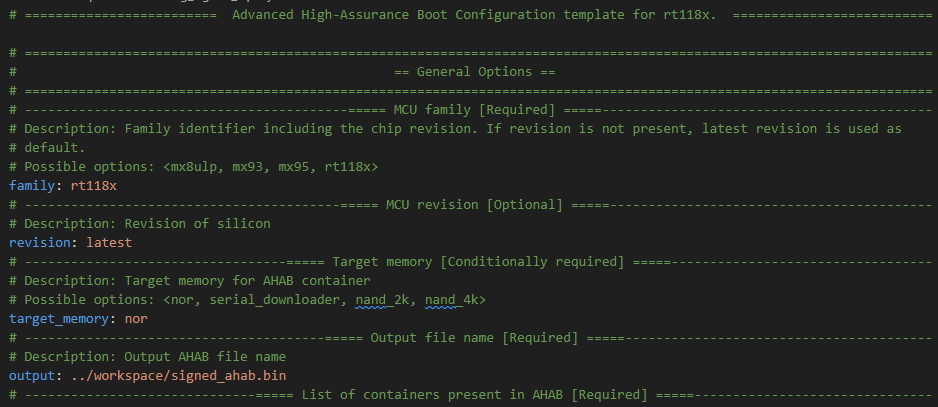
I. We need to change the output file name. Target memory is nor by default. This represent the memory which RT118x will boot from.
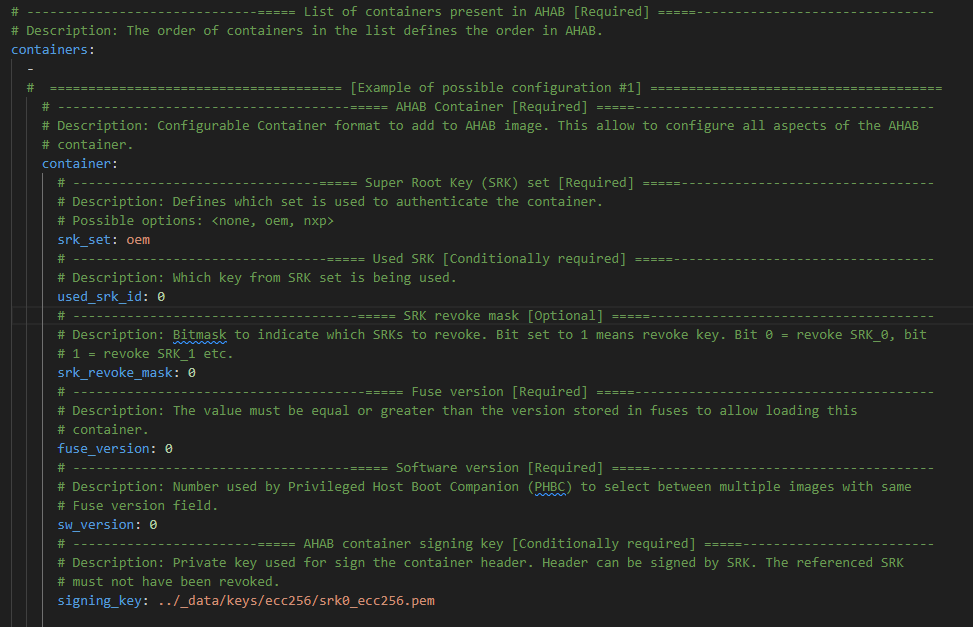
II. Define the general settings of AHAB container for the application. In our example the signature provider definition is removed and path
to the pre-generated private signing key is configured. The field “use_srk_id” refers to the index of the signing key.It must be aligned with “signing_key” index.
“use_srk_id=0” corresponds with “srk0_ecc256.pem”
“use_srk_id=1” corresponds with “srk1_ecc256.pem”
“use_srk_id=2” corresponds with “srk2_ecc256.pem”
“use_srk_id=3” corresponds with “srk3_ecc256.pem”
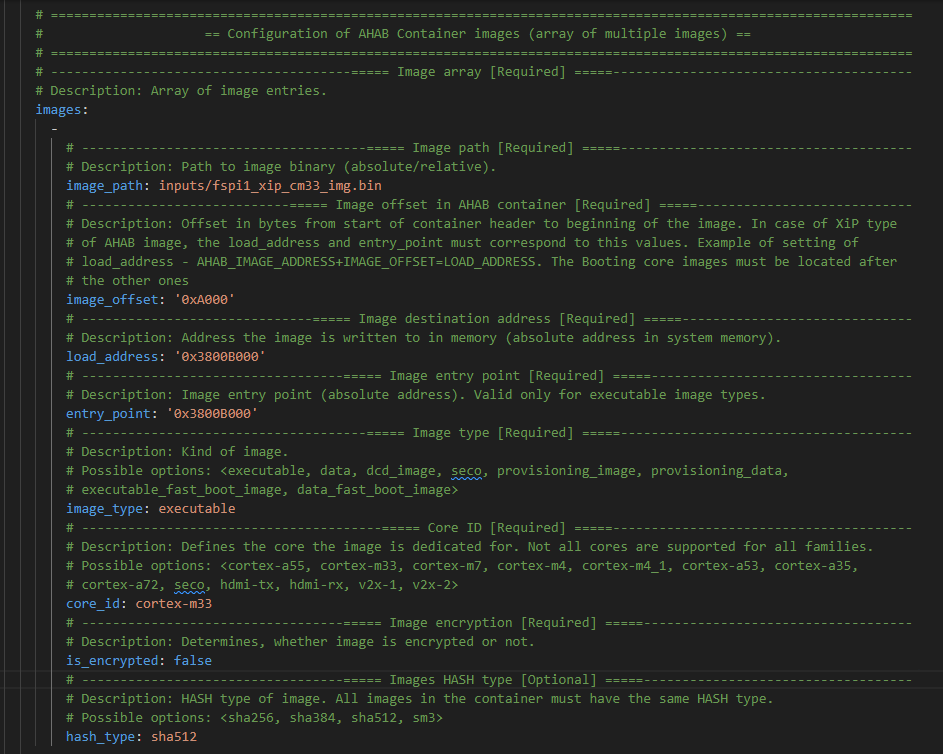
III. Define the image executable (compiled application binary). The application offset must be set to 0xA000 to align application address with SDK linker files. This offset is used to allow base ELE FW inclusion into the bootable image (32KB).
The most important are ‘load_address’ and ‘entry_point’ fields that must be sets on same value as is defined linker file for start of the application. ‘load_address’ represents destination address on which application data are copied from source memory. ‘entry_point’ points to the reset vector of the application. Usually both address points onto the same address, unless there are soma data placed before image vector table. Fro example dual core applications where CM7 image is included before CM33 image. For this specific use case the ‘entry_point’ must be aligned with CM33 linker files. The unused optionally fields has been removed from config.
Hash parametr is mandatory for AHAB. The integrity check is always performed during boot. On OEM_OPEN the invalid hash reports “warning” which allows image to boot, but in OEM_CLOSED the boot of the FW will be prevented in case of invalid hash. The example below is for XiP target executed for nor memory connected to FlexSPI 1. Examples for bootable images into FlexSPI2, OCRAM, CTCM, and multicore are also present in teh inputs folder.
config_signed_fspi1.yaml (demonstrated)
config_signed_fspi2.yaml
config_signed_ctcm.yaml
config_signed_ocram.yaml
config_signed_multicore_fspi1.yaml
config_signed_multicore_fspi2.yaml
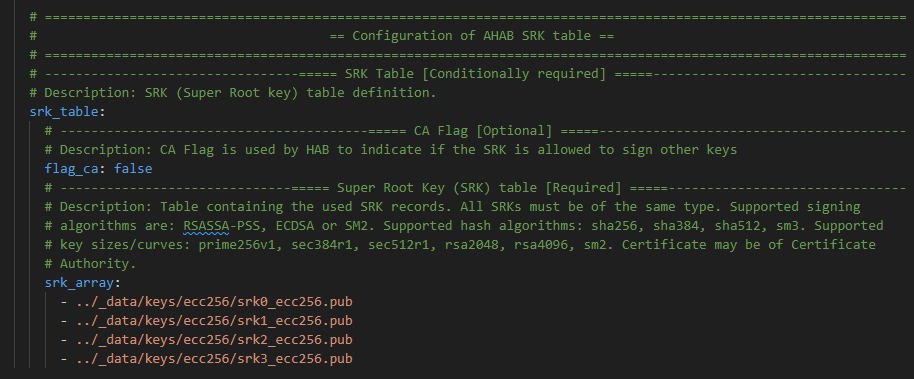
IV. Define the SRK (Super Root Keys) array. In our case the local pre-generated public keys.
V. And finally unused parts for AHAB Certificate and Encryption blob were removed from the yaml file.
To export AHAB container is designed SPSDK tool in ‘nxpimage’ under ‘ahab’ sub commands group.
# How to use the ahab export command
%! nxpimage ahab export
nxpimage ahab export
Usage: nxpimage ahab export [OPTIONS]

  Generate AHAB Image from YAML/JSON configuration.

  The configuration template files could be generated by subcommand 'get-
  template'.

Options:
  -c, --config FILE  Path to the YAML/JSON configuration file.  [required]
  --plugin FILE      External python file/package containing a custom plugin
                     implementation.
  --help             Show this message and exit.
# For this example, signed xip application from FlexSPI 1 is used by default
AHAB_CONFIG = INPUTS + "config_signed_fspi1.yaml"  # Prepared AHAB configuration file
# AHAB_CONFIG = INPUTS + "config_signed_fspi2.yaml"                   # Prepared AHAB configuration file
# AHAB_CONFIG = INPUTS + "config_signed_ctcm.yaml"                    # Prepared AHAB configuration file
# AHAB_CONFIG = INPUTS + "config_signed_ocram.yaml"                   # Prepared AHAB configuration file
# AHAB_CONFIG = INPUTS + "config_signed_multicore_fspi1.yaml"         # Prepared AHAB configuration file
# AHAB_CONFIG = INPUTS + "config_signed_multicore_fspi2.yaml"         # Prepared AHAB configuration file

assert os.path.exists(AHAB_CONFIG)
# Export AHAB container using nxpimage
%! nxpimage $VERBOSITY ahab export -c $AHAB_CONFIG
nxpimage  ahab export -c inputs/config_signed_fspi1.yaml
Success. (AHAB: workspace\signed_ahab.bin created.)
Generated file containing SRK hash: workspace\signed_ahab_oem0_srk0_hash.txt
Generated script for writing fuses for container 0: workspace\signed_ahab_oem0_srk0_hash_blhost.bcf
5. Program the image into external memory.#
RT118x requires boot from an external memory. To build a valid bootable image, another structures must be placed into external memory depending on bootable image type. For signed AHAB, ony FCB is required besides ahab and image itself. See the figure below for information:
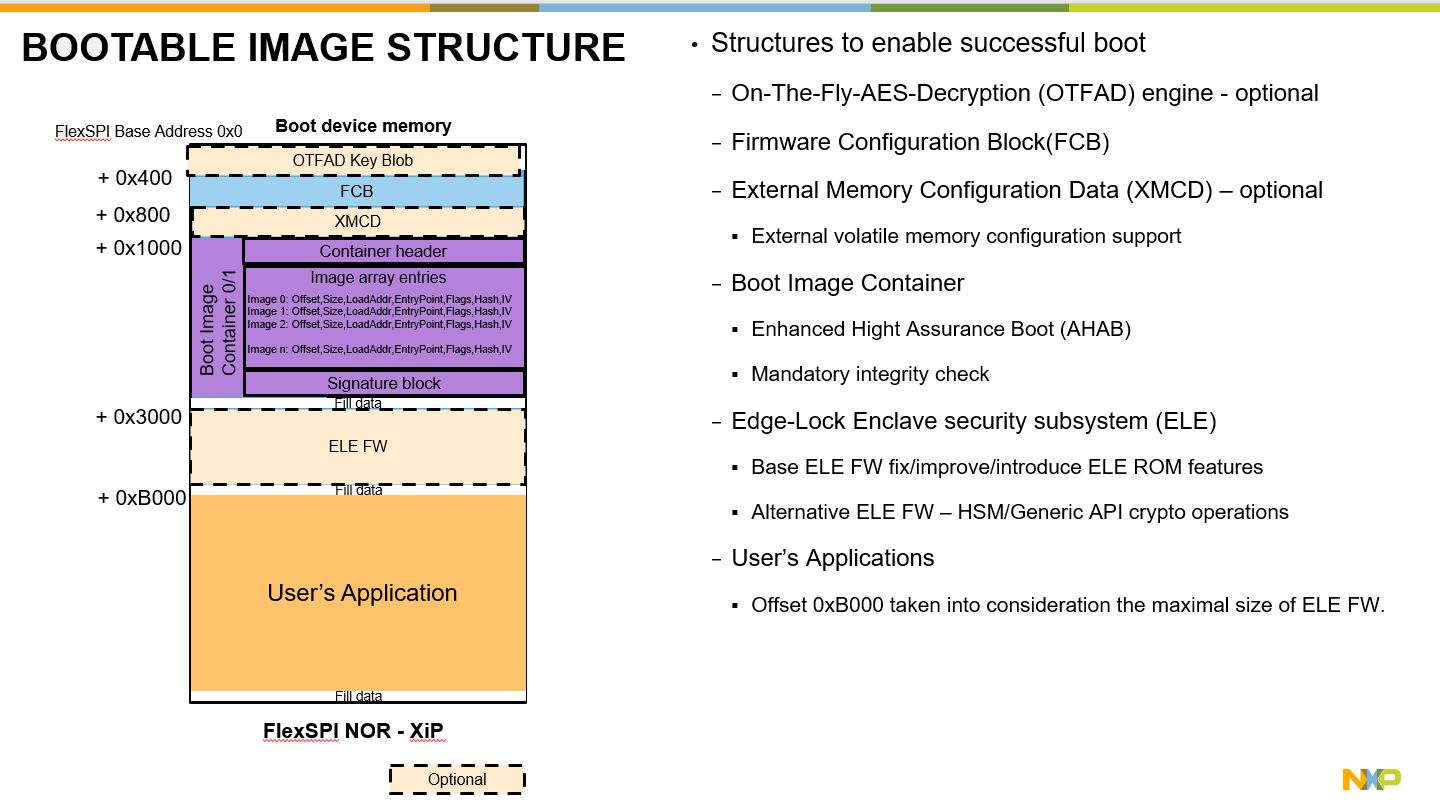
The SPSDK contains commands group that simplify whole operation with bootable images under ‘nxpimage’.
I. Configure external memory. SPDSK contains tool called “nxpmemcfg” which contains database of supported memories and utilities to supports creation, extraction, parsing of FCB etc.
# What utilities we have nin nxpmemcfg
%! nxpmemcfg
nxpmemcfg
Usage: nxpmemcfg [OPTIONS] COMMAND [ARGS]...

  Collection of utilities for memory configuration operations.

Options:
  -v, --verbose  Print more detailed information
  -vv, --debug   Display more debugging information.
  --version      Show the version and exit.
  --help         Show this message and exit.

Commands:
  nxpmemcfg          Collection of utilities for memory configuration operations.
  ├── blhost-script  Export the configuration option words to blhost script.
  ├── export         Export the configuration option words from configuration.
  ├── family-info    List known memory configurations for the family.
  ├── get-families   Shows the full families information for commands in this group.
  ├── get-templates  Create template of Memory option words in YAML format.
  └── parse          Parse the existing memory configuration option words.
# Print out all supported memories
%! nxpmemcfg family-info
nxpmemcfg family-info
List of all supported peripherals and its instances:
╔════╦════════════╦═════════════╦══════════════╦══════════╦═══════════╦══════════════════════════╦════════╦════════╗
║ #  ║   Family   ║ flexspi_nor ║ flexspi_nand ║ semc_nor ║ semc_nand ║         spi_nor          ║  mmc   ║   sd   ║
╠════╬════════════╬═════════════╬══════════════╬══════════╬═══════════╬══════════════════════════╬════════╬════════╣
║ 0  ║  lpc5502   ║     N/A     ║     N/A      ║   N/A    ║    N/A    ║           [3]            ║  N/A   ║  N/A   ║
║ 1  ║  lpc5504   ║     N/A     ║     N/A      ║   N/A    ║    N/A    ║           [3]            ║  N/A   ║  N/A   ║
║ 2  ║  lpc5506   ║     N/A     ║     N/A      ║   N/A    ║    N/A    ║           [3]            ║  N/A   ║  N/A   ║
║ 3  ║  lpc5512   ║     N/A     ║     N/A      ║   N/A    ║    N/A    ║           [3]            ║  N/A   ║  N/A   ║
║ 4  ║  lpc5514   ║     N/A     ║     N/A      ║   N/A    ║    N/A    ║           [3]            ║  N/A   ║  N/A   ║
║ 5  ║  lpc5516   ║     N/A     ║     N/A      ║   N/A    ║    N/A    ║           [3]            ║  N/A   ║  N/A   ║
║ 6  ║  lpc5526   ║     N/A     ║     N/A      ║   N/A    ║    N/A    ║           [3]            ║  N/A   ║  N/A   ║
║ 7  ║  lpc5528   ║     N/A     ║     N/A      ║   N/A    ║    N/A    ║           [3]            ║  N/A   ║  N/A   ║
║ 8  ║  lpc55s04  ║     N/A     ║     N/A      ║   N/A    ║    N/A    ║           [3]            ║  N/A   ║  N/A   ║
║ 9  ║  lpc55s06  ║     N/A     ║     N/A      ║   N/A    ║    N/A    ║           [3]            ║  N/A   ║  N/A   ║
║ 10 ║  lpc55s14  ║     N/A     ║     N/A      ║   N/A    ║    N/A    ║           [3]            ║  N/A   ║  N/A   ║
║ 11 ║  lpc55s16  ║     N/A     ║     N/A      ║   N/A    ║    N/A    ║           [3]            ║  N/A   ║  N/A   ║
║ 12 ║  lpc55s26  ║     N/A     ║     N/A      ║   N/A    ║    N/A    ║           [3]            ║  N/A   ║  N/A   ║
║ 13 ║  lpc55s28  ║     N/A     ║     N/A      ║   N/A    ║    N/A    ║           [3]            ║  N/A   ║  N/A   ║
║ 14 ║  lpc55s36  ║     Yes     ║     N/A      ║   N/A    ║    N/A    ║       [0, 1, 3, 8]       ║  N/A   ║  N/A   ║
║ 15 ║  lpc55s66  ║     N/A     ║     N/A      ║   N/A    ║    N/A    ║           [3]            ║  N/A   ║  N/A   ║
║ 16 ║  lpc55s69  ║     N/A     ║     N/A      ║   N/A    ║    N/A    ║           [3]            ║  N/A   ║  N/A   ║
║ 17 ║  mcxn235   ║     N/A     ║     N/A      ║   N/A    ║    N/A    ║           [7]            ║  N/A   ║  N/A   ║
║ 18 ║  mcxn236   ║     N/A     ║     N/A      ║   N/A    ║    N/A    ║           [7]            ║  N/A   ║  N/A   ║
║ 19 ║ mimxrt1010 ║     Yes     ║     N/A      ║   N/A    ║    N/A    ║           N/A            ║  N/A   ║  N/A   ║
║ 20 ║ mimxrt1015 ║     Yes     ║     Yes      ║   N/A    ║    N/A    ║       [1, 2, 3, 4]       ║  N/A   ║  N/A   ║
║ 21 ║ mimxrt1020 ║     Yes     ║     Yes      ║   Yes    ║    Yes    ║       [1, 2, 3, 4]       ║ [1, 2] ║ [1, 2] ║
║ 22 ║ mimxrt1024 ║     Yes     ║     Yes      ║   Yes    ║    Yes    ║       [1, 2, 3, 4]       ║ [1, 2] ║ [1, 2] ║
║ 23 ║ mimxrt1040 ║     Yes     ║     Yes      ║   Yes    ║    Yes    ║       [1, 2, 3, 4]       ║ [1, 2] ║ [1, 2] ║
║ 24 ║ mimxrt1050 ║     Yes     ║     Yes      ║   Yes    ║    Yes    ║       [1, 2, 3, 4]       ║ [1, 2] ║ [1, 2] ║
║ 25 ║ mimxrt1060 ║    [1, 2]   ║     Yes      ║   Yes    ║    Yes    ║       [1, 2, 3, 4]       ║ [1, 2] ║ [1, 2] ║
║ 26 ║ mimxrt1064 ║     Yes     ║     Yes      ║   Yes    ║    Yes    ║       [1, 2, 3, 4]       ║ [1, 2] ║ [1, 2] ║
║ 27 ║ mimxrt1165 ║    [1, 2]   ║    [1, 2]    ║   Yes    ║    Yes    ║       [1, 2, 3, 4]       ║ [1, 2] ║ [1, 2] ║
║ 28 ║ mimxrt1166 ║    [1, 2]   ║    [1, 2]    ║   Yes    ║    Yes    ║       [1, 2, 3, 4]       ║ [1, 2] ║ [1, 2] ║
║ 29 ║ mimxrt1171 ║    [1, 2]   ║    [1, 2]    ║   Yes    ║    Yes    ║       [1, 2, 3, 4]       ║ [1, 2] ║ [1, 2] ║
║ 30 ║ mimxrt1172 ║    [1, 2]   ║    [1, 2]    ║   Yes    ║    Yes    ║       [1, 2, 3, 4]       ║ [1, 2] ║ [1, 2] ║
║ 31 ║ mimxrt1173 ║    [1, 2]   ║    [1, 2]    ║   Yes    ║    Yes    ║       [1, 2, 3, 4]       ║ [1, 2] ║ [1, 2] ║
║ 32 ║ mimxrt1175 ║    [1, 2]   ║    [1, 2]    ║   Yes    ║    Yes    ║       [1, 2, 3, 4]       ║ [1, 2] ║ [1, 2] ║
║ 33 ║ mimxrt1176 ║    [1, 2]   ║    [1, 2]    ║   Yes    ║    Yes    ║       [1, 2, 3, 4]       ║ [1, 2] ║ [1, 2] ║
║ 34 ║ mimxrt1181 ║    [1, 2]   ║    [1, 2]    ║   Yes    ║    Yes    ║       [1, 2, 4, 5]       ║ [1, 2] ║ [1, 2] ║
║ 35 ║ mimxrt1182 ║    [1, 2]   ║    [1, 2]    ║   Yes    ║    Yes    ║       [1, 2, 4, 5]       ║ [1, 2] ║ [1, 2] ║
║ 36 ║ mimxrt1187 ║    [1, 2]   ║    [1, 2]    ║   Yes    ║    Yes    ║       [1, 2, 4, 5]       ║ [1, 2] ║ [1, 2] ║
║ 37 ║ mimxrt1189 ║    [1, 2]   ║    [1, 2]    ║   Yes    ║    Yes    ║       [1, 2, 4, 5]       ║ [1, 2] ║ [1, 2] ║
║ 38 ║ mimxrt533s ║    [0, 1]   ║    [0, 1]    ║   N/A    ║    N/A    ║ [0, 1, 2, 3, 4, 5, 6, 7] ║ [0, 1] ║ [0, 1] ║
║ 39 ║ mimxrt555s ║    [0, 1]   ║    [0, 1]    ║   N/A    ║    N/A    ║ [0, 1, 2, 3, 4, 5, 6, 7] ║ [0, 1] ║ [0, 1] ║
║ 40 ║ mimxrt595s ║    [0, 1]   ║    [0, 1]    ║   N/A    ║    N/A    ║ [0, 1, 2, 3, 4, 5, 6, 7] ║ [0, 1] ║ [0, 1] ║
║ 41 ║ mimxrt685s ║    [0, 1]   ║    [0, 1]    ║   N/A    ║    N/A    ║ [0, 1, 2, 3, 4, 5, 6, 7] ║ [0, 1] ║ [0, 1] ║
║ 42 ║   rw610    ║     Yes     ║     N/A      ║   N/A    ║    N/A    ║     [0, 1, 2, 3, 4]      ║  N/A   ║  N/A   ║
║ 43 ║   rw612    ║     Yes     ║     N/A      ║   N/A    ║    N/A    ║     [0, 1, 2, 3, 4]      ║  N/A   ║  N/A   ║
╚════╩════════════╩═════════════╩══════════════╩══════════╩═══════════╩══════════════════════════╩════════╩════════╝
List of all known memory configuration option words:
╔════╦══════════════╦══════════════╦══════════════════════╦═════════════╦════════════════════════════════════╗
║ #  ║  Peripheral  ║ Manufacturer ║         Name         ║  Interface  ║ Option words                       ║
╠════╬══════════════╬══════════════╬══════════════════════╬═════════════╬════════════════════════════════════╣
║ 0  ║ flexspi_nor  ║   Winbond    ║      W25QxxxJV       ║   quad_spi  ║ Opt0: 0xC0000207                   ║
║ 1  ║ flexspi_nor  ║   Winbond    ║       W35T51NW       ║  octal_spi  ║ Opt0: 0xC0603005                   ║
║ 2  ║ flexspi_nor  ║   Macronix   ║     MX25Uxxx32F      ║   quad_spi  ║ Opt0: 0xC0000007                   ║
║ 3  ║ flexspi_nor  ║   Macronix   ║     MX25Lxxx45G      ║   quad_spi  ║ Opt0: 0xC0000007                   ║
║ 4  ║ flexspi_nor  ║   Macronix   ║     MX25UMxxx45G     ║  octal_spi  ║ Opt0: 0xC0403037                   ║
║ 5  ║ flexspi_nor  ║   Macronix   ║     MX66UMxxx45G     ║  octal_spi  ║ Opt0: 0xC0403037                   ║
║ 6  ║ flexspi_nor  ║   Macronix   ║     MX25LMxxx45G     ║  octal_spi  ║ Opt0: 0xC0403037                   ║
║ 7  ║ flexspi_nor  ║   Macronix   ║     MX25UM51345G     ║  octal_spi  ║ Opt0: 0xC0403037                   ║
║ 8  ║ flexspi_nor  ║   Macronix   ║   MX25UM51345G_2nd   ║  octal_spi  ║ Opt0: 0xC1503051, Opt1: 0x20000014 ║
║ 9  ║ flexspi_nor  ║  GigaDevice  ║      GD25QxxxC       ║   quad_spi  ║ Opt0: 0xC0000406                   ║
║ 10 ║ flexspi_nor  ║  GigaDevice  ║      GD25LBxxxE      ║   quad_spi  ║ Opt0: 0xC0000007                   ║
║ 11 ║ flexspi_nor  ║  GigaDevice  ║      GD25LTxxxE      ║   quad_spi  ║ Opt0: 0xC0000008                   ║
║ 12 ║ flexspi_nor  ║  GigaDevice  ║      GD25LXxxxE      ║   quad_spi  ║ Opt0: 0xC0603008                   ║
║ 13 ║ flexspi_nor  ║     ISSI     ║      IS25LPxxxA      ║   quad_spi  ║ Opt0: 0xC0000007                   ║
║ 14 ║ flexspi_nor  ║     ISSI     ║      IS25WPxxxA      ║   quad_spi  ║ Opt0: 0xC0000007                   ║
║ 15 ║ flexspi_nor  ║     ISSI     ║      IS25LXxxx       ║  octal_spi  ║ Opt0: 0xC0603005                   ║
║ 16 ║ flexspi_nor  ║     ISSI     ║      IS25WXxxx       ║  octal_spi  ║ Opt0: 0xC0603005                   ║
║ 17 ║ flexspi_nor  ║     ISSI     ║      IS26KSxxxS      ║ hyper_flash ║ Opt0: 0xC0233007                   ║
║ 18 ║ flexspi_nor  ║     ISSI     ║      IS26KLxxxS      ║ hyper_flash ║ Opt0: 0xC0233007                   ║
║ 19 ║ flexspi_nor  ║    Micron    ║      MT25QLxxxA      ║   quad_spi  ║ Opt0: 0xC0000007                   ║
║ 20 ║ flexspi_nor  ║    Micron    ║ RW303-MT35XUxxxABA1G ║  octal_spi  ║ Opt0: 0xC0603005                   ║
║ 21 ║ flexspi_nor  ║    Micron    ║ RW304-MT35XUxxxABA2G ║  octal_spi  ║ Opt0: 0xC0633005                   ║
║ 22 ║ flexspi_nor  ║    Adesto    ║      AT25SFxxxA      ║   quad_spi  ║ Opt0: 0xC0000007                   ║
║ 23 ║ flexspi_nor  ║    Adesto    ║       ATXPxxx        ║  octal_spi  ║ Opt0: 0xC0803007                   ║
║ 24 ║ flexspi_nor  ║   Cypress    ║      S25FSxxxS       ║   quad_spi  ║ Opt0: 0xC0000007                   ║
║ 25 ║ flexspi_nor  ║   Cypress    ║      S25FLxxxS       ║   quad_spi  ║ Opt0: 0xC0000007                   ║
║ 26 ║ flexspi_nor  ║   Cypress    ║      S26KSxxxS       ║ hyper_flash ║ Opt0: 0xC0233007                   ║
║ 27 ║ flexspi_nor  ║   Cypress    ║      S26KLxxxS       ║ hyper_flash ║ Opt0: 0xC0233007                   ║
║ 28 ║ flexspi_nor  ║  Microchip   ║     SST26VFxxxB      ║   quad_spi  ║ Opt0: 0xC0000005                   ║
║ 29 ║ flexspi_nor  ║  FudanMicro  ║       FM25Qxxx       ║   quad_spi  ║ Opt0: 0xC0000205                   ║
║ 30 ║ flexspi_nor  ║  BoyaMicro   ║      BY25QxxxBS      ║   quad_spi  ║ Opt0: 0xC0000405                   ║
║ 31 ║ flexspi_nor  ║     XMC      ║      XM25QHxxxB      ║   quad_spi  ║ Opt0: 0xC0000007                   ║
║ 32 ║ flexspi_nor  ║     XMC      ║      XM25QUxxxB      ║   quad_spi  ║ Opt0: 0xC0000007                   ║
║ 33 ║ flexspi_nor  ║   XTXtech    ║       X25FxxxB       ║   quad_spi  ║ Opt0: 0xC0000407                   ║
║ 34 ║ flexspi_nor  ║   XTXtech    ║       X25QxxxD       ║   quad_spi  ║ Opt0: 0xC0000407                   ║
║ 35 ║ flexspi_nor  ║     Puya     ║      P25QxxxLE       ║   quad_spi  ║ Opt0: 0xC0000405                   ║
║ 36 ║ flexspi_nor  ║     Puya     ║       P25QxxxH       ║   quad_spi  ║ Opt0: 0xC0000405                   ║
║ 37 ║ flexspi_nor  ║     Puya     ║       P25QxxxU       ║   quad_spi  ║ Opt0: 0xC0000405                   ║
║ 38 ║ flexspi_nor  ║     AMIC     ║       A25LQxxx       ║   quad_spi  ║ Opt0: 0xC0000105                   ║
╚════╩══════════════╩══════════════╩══════════════════════╩═════════════╩════════════════════════════════════╝
║ 39 ║ flexspi_nand ║   Winbond    ║       W25N01G        ║   quad_spi  ║ Opt0: 0xC1010026, Opt1: 0x000000EF ║
║ 40 ║ flexspi_nand ║   Winbond    ║       W25N02K        ║   quad_spi  ║ Opt0: 0xC1020026, Opt1: 0x000000EF ║
║ 41 ║ flexspi_nand ║   Macronix   ║       MX35UF1G       ║   quad_spi  ║ Opt0: 0xC1010026, Opt1: 0x000000C2 ║
║ 42 ║ flexspi_nand ║   Macronix   ║       MX35LF1G       ║   quad_spi  ║ Opt0: 0xC1010026, Opt1: 0x000000C2 ║
║ 43 ║ flexspi_nand ║   Macronix   ║       MX35UF2G       ║   quad_spi  ║ Opt0: 0xC1020026, Opt1: 0x000000C2 ║
║ 44 ║ flexspi_nand ║   Macronix   ║       MX35LF2G       ║   quad_spi  ║ Opt0: 0xC1020026, Opt1: 0x000000C2 ║
║ 45 ║ flexspi_nand ║  GigaDevice  ║       GD5F1GQ5       ║   quad_spi  ║ Opt0: 0xC1010026, Opt1: 0x000000C8 ║
║ 46 ║ flexspi_nand ║  GigaDevice  ║       GD5F2GQ5       ║   quad_spi  ║ Opt0: 0xC1020026, Opt1: 0x000000C8 ║
║ 47 ║ flexspi_nand ║    Micron    ║     MT29F1G01AA      ║   quad_spi  ║ Opt0: 0xC1011022, Opt1: 0x0000002C ║
║ 48 ║ flexspi_nand ║    Micron    ║     MT29F2G01AA      ║   quad_spi  ║ Opt0: 0xC1021022, Opt1: 0x0000002C ║
║ 49 ║ flexspi_nand ║   Paragon    ║       PN26Q01A       ║   quad_spi  ║ Opt0: 0xC1010026, Opt1: 0x000000A1 ║
║ 50 ║ flexspi_nand ║   Paragon    ║       PN26G01A       ║   quad_spi  ║ Opt0: 0xC1010026, Opt1: 0x000000A1 ║
║ 51 ║ flexspi_nand ║   Paragon    ║       PN26Q02A       ║   quad_spi  ║ Opt0: 0xC1020026, Opt1: 0x000000A1 ║
║ 52 ║ flexspi_nand ║   Paragon    ║       PN26G02A       ║   quad_spi  ║ Opt0: 0xC1020026, Opt1: 0x000000A1 ║
╚════╩══════════════╩══════════════╩══════════════════════╩═════════════╩════════════════════════════════════╝
║ 53 ║   semc_nor   ║    Micron    ║     MT28EW128ABA     ║   parallel  ║ Opt0: 0xD0000600                   ║
║ 54 ║   semc_nor   ║    Micron    ║     MT28UG128ABA     ║   parallel  ║ Opt0: 0xD0000601                   ║
╚════╩══════════════╩══════════════╩══════════════════════╩═════════════╩════════════════════════════════════╝
║ 55 ║      sd      ║   General    ║      1bit_sdr12      ║  instance_0 ║ Opt0: 0xD0000000                   ║
║ 56 ║      sd      ║   General    ║      1bit_sdr12      ║  instance_1 ║ Opt0: 0xD0000001                   ║
║ 57 ║      sd      ║   General    ║      1bit_sdr12      ║  instance_2 ║ Opt0: 0xD0000002                   ║
║ 58 ║      sd      ║   General    ║      1bit_sdr12      ║  instance_3 ║ Opt0: 0xD0000003                   ║
╚════╩══════════════╩══════════════╩══════════════════════╩═════════════╩════════════════════════════════════╝
# How to use the blhost-script
%! nxpmemcfg blhost-script
nxpmemcfg blhost-script
Usage: nxpmemcfg blhost-script [OPTIONS]

  Export the configuration option words to blhost script.

Options:
  Known chip select. Alternative to known chip is YAML configuration '-c': [all_or_none]
    -f, --family [lpc5502|lpc5504|lpc5506|lpc5512..., and more. Use 'get-families' command to show all.]
                                  Select the chip family.
    -m, --memory-chip TEXT        Select supported memory chip name. Use
                                  family-info command to get the known names.
    -i, --interface TEXT          Select supported memory chip interface. Use
                                  family-info command to get the known
                                  interfaces.
  -c, --config FILE               Option word configuration YAML file, in case
                                  that known chip has not been used
  -ix, --instance INTEGER         Instance of peripheral if applicable
  --fcb PATH                      Optional filename of FCB block generated by
                                  HW and read back to PC. Be aware that script
                                  will contain also erase of 4KB on base
                                  address.
  --secure-addresses              If defined, the secure address will be used
                                  in case of generating FCB block.
  -o, --output FILE               Name of BLHOST script. If not specified, the
                                  script will be printed to command line
  --force                         Force overwriting of existing files.
  --help                          Show this message and exit.
# Generate script to configure FlexSPI interface for the specific memory and extract FCB.
%! nxpmemcfg blhost-script -f mimxrt1189 -m W25QxxxJV -i quad_spi -ix 1 -o $CFG_MEM_FILE --force --fcb $FCB_FILE

assert os.path.exists(CFG_MEM_FILE)
nxpmemcfg blhost-script -f mimxrt1189 -m W25QxxxJV -i quad_spi -ix 1 -o workspace/config_mem.bls --force --fcb workspace/fcb.bin
Detected peripheral flexspi_nor for W25QxxxJV
Loaded option words: 0xC0000207
WARNING:spsdk.memcfg.memcfg:FCB block read back script has been generated. Be aware that s 4KB block at base address will be erased to avoid cumulative write! (227ms since start, memcfg.py:399)
Exported blhost script.
EVK Board Overview#
The following picture describes connector placement of RT1180 EVK.#
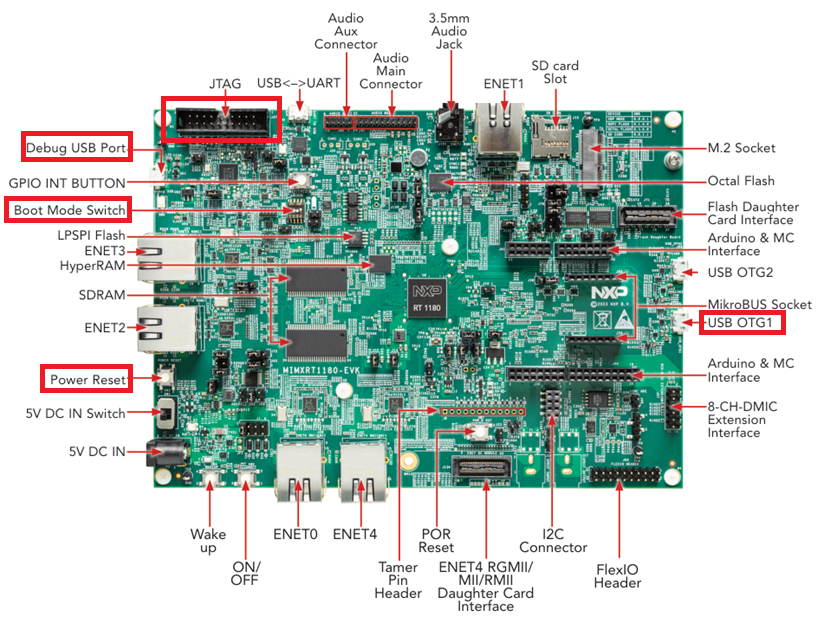
Serial Downloader Protocol Mode:#
Configure Boot Mode Switch to : 1/2/3-OFF, 4-ON
Connect micro USB cable into USB OTG1 - J33
Connect micro USB cable into Debug USB Port - J53
Internal Boot Mode:#
Configure Boot Mode Switch to :1-OFF, 2-ON, 3-OFF, 4-OFF
Connect micro USB cable into Debug USB Port - J53
# The board must be in SDP mode
# Configure Boot Mode Switch to : 1/2/3-OFF, 4-ON
# Connect micro USB cable into USB OTG1         - J33
# Connect micro USB cable into Debug USB Port   - J53

# Parameters for BLSHOST. USB PID/VID for ROM Flashloader and NXP Flashloader

COMPAR = "-u"  # USB
BLHOST_CONNECT_ROM = "0x1fc9,0x014c"  # PID/VID of ROM
BLHOST_CONNECT_FLDR = "0x15A2,0x0073"  # PID/VID of NXP Flashloader

# To use tha UART compar parameter must be change, COMxx must be replaced by the name of your COM port, 115200 is default baudrate.
# compar="-p"                                                           # UART
# BLHOST_CONNECT_ROM="COMxx,115200"                                     # COM port, baudrate
# BLHOST_CONNECT_FLDR="COMxx,115200"                                    # COM port, baudrate

assert os.path.exists(FLASHLOADER_FILE)

# Load flashloader
%! blhost $VERBOSITY $COMPAR $BLHOST_CONNECT_ROM get-property 1
%! blhost $VERBOSITY $COMPAR $BLHOST_CONNECT_ROM load-image $FLASHLOADER_FILE
blhost  -u 0x1fc9,0x014c get-property 1
Response status = 0 (0x0) Success.
Response word 1 = 1258487809 (0x4b030001)
Current Version = K3.0.1
blhost  -u 0x1fc9,0x014c load-image ../flashloader/ahab/workspace/flashloader.bin
Loading image
Response status = 0 (0x0) Success.
# Ping the RT1180
%! blhost $VERBOSITY $COMPAR $BLHOST_CONNECT_FLDR get-property 7
# Ping the RT1180
%! blhost $VERBOSITY $COMPAR $BLHOST_CONNECT_FLDR get-property 1

# Execute the commands generated by "blhost-script". This script will configure flash,
# program FCB into the external memory and reads back the binary data. Be aware tha erase of the first sector must be done.
# The script can be executed only once to read FCB.
%! blhost $COMPAR $BLHOST_CONNECT_FLDR batch $CFG_MEM_FILE

assert os.path.exists(FCB_FILE)
blhost  -u 0x15A2,0x0073 get-property 7
Response status = 0 (0x0) Success.
Response word 1 = 25530335 (0x1858fdf)
Available Commands = ['FlashEraseAll', 'FlashEraseRegion', 'ReadMemory', 'WriteMemory', 'FillMemory', 'GetProperty', 'ReceiveSBFile', 'Execute', 'Call', 'Reset', 'SetProperty', 'FlashReadResource', 'ConfigureMemory', 'GenerateKeyBlob', 'UpdateLifeCycle', 'EleMessage']
blhost  -u 0x15A2,0x0073 get-property 1
Response status = 0 (0x0) Success.
Response word 1 = 1258424320 (0x4b020800)
Current Version = K2.8.0
blhost -u 0x15A2,0x0073 batch workspace/config_mem.bls
Response status = 0 (0x0) Success.
Response status = 0 (0x0) Success.
Response status = 0 (0x0) Success.
Response status = 0 (0x0) Success.
Response status = 0 (0x0) Success.
Response status = 0 (0x0) Success.
Response status = 0 (0x0) Success.
Reading memory
Response status = 0 (0x0) Success.
Response word 1 = 512 (0x200)
Read 512 of 512 bytes.
II. Program Application#
# Get the template file of configuration for bootable image
%! nxpimage $VERBOSITY bootable-image get-templates -f mimxrt1189 -o $BIMG_TEMPLATES --force
nxpimage  bootable-image get-templates -f rt118x -o workspace/bootable_image_templates --force
Creating workspace/bootable_image_templates/bootimg_rt118x_serial_downloader.yaml template file.
Creating workspace/bootable_image_templates/bootimg_rt118x_flexspi_nor.yaml template file.
Creating workspace/bootable_image_templates/bootimg_rt118x_flexspi_nand.yaml template file.
Creating workspace/bootable_image_templates/bootimg_rt118x_semc_nand.yaml template file.
Creating workspace/bootable_image_templates/bootimg_rt118x_emmc.yaml template file.
Creating workspace/bootable_image_templates/bootimg_rt118x_sd.yaml template file.
The template file must be modified. Resulting file can be found in the input folder.#
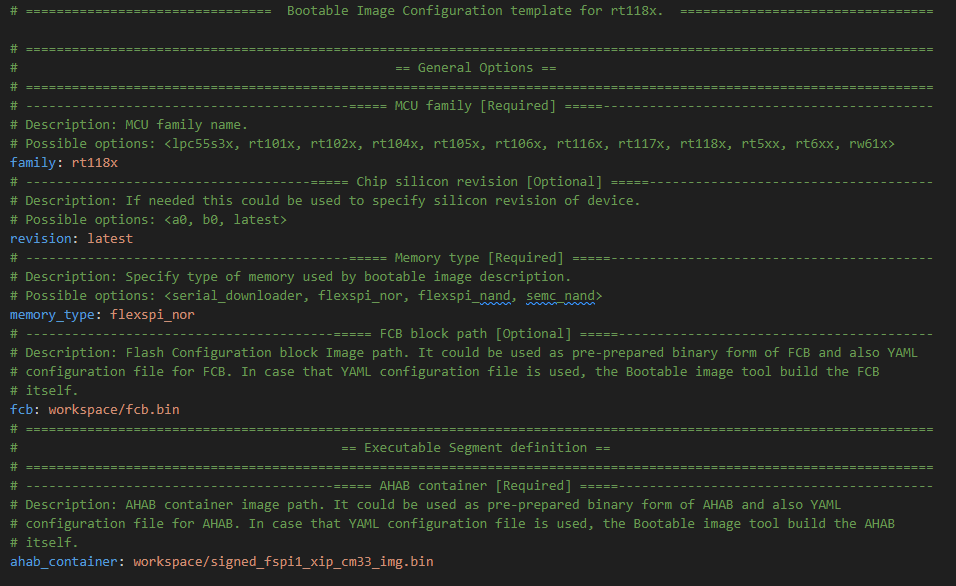
Export the final bootable image
# Export bootable image
%! nxpimage $VERBOSITY bootable-image merge -c $BIMG_FILE -o $BOOTABLE_IMAGE

# Assert os.path.exists(BOOTABLE_IMAGE)
assert os.path.isfile(BOOTABLE_IMAGE)
nxpimage  bootable-image merge -c inputs/bootimg_rt118x_flexspi_nor.yaml -o workspace/bootable_img.bin
Success. (Bootable Image: workspace\bootable_img.bin created)
# Base address of FlexSPI 1
FLASH_ADDRESS = "0x28000000"

# Base address of FlexSPI 2
# FLASH_ADDRESS = "0x04000000"

# Size of external memory to erase
ERASE_SIZE = "0x50000"

# Erase flash
%! blhost $VERBOSITY $COMPAR $BLHOST_CONNECT_FLDR flash-erase-region $FLASH_ADDRESS $ERASE_SIZE
# Write image - 0x38000000
%! blhost $VERBOSITY $COMPAR $BLHOST_CONNECT_FLDR write-memory $FLASH_ADDRESS $BOOTABLE_IMAGE

# Switch the board into internal boot and reset.

# Configure Boot Mode Switch to :1-OFF, 2-ON, 3-OFF, 4-OFF
# Connect micro USB cable into Debug USB Port - J53
# Open Serial Terminal (115200)
# Reset the board

# The "hello_world" with time should be printed on the terminal:
# hello world new 14:36:56
blhost  -u 0x15A2,0x0073 flash-erase-region 0x28000000 0x50000
Response status = 0 (0x0) Success.
blhost  -u 0x15A2,0x0073 write-memory 0x28000000 workspace/bootable_img.bin
Writing memory
Response status = 0 (0x0) Success.
Response word 1 = 61440 (0xf000)
6. Burn Super Root Key Hash (SRKH) and Manage Lifecycle.#
After successful validation of previous steps we can proceed with final security enablement. SRKH must be programmed into corresponding fuses to establish root of trust. On RT118x the dedicated ELE command must be used to move lifecycle to OEM_CLOSED which enforces security.
Only authenticated FW images will be executed. Debug features will be limited and must be unlocked by debug mailbox feature.
Debug mailbox example is located HERE.
WARNING!!! This step is destructive operation (updating life cycle)
# The board must be in SDP mode
# Configure Boot Mode Switch to : 1/2/3-OFF, 4-ON
# Connect micro USB cable into USB OTG1         - J33
# Connect micro USB cable into Debug USB Port   - J53

from time import sleep

assert os.path.exists(FLASHLOADER_FILE)
assert os.path.exists(SRKH_BATCH_FILE)

# To enable this script, set the variable below to 1
enable_script = 0
if enable_script:

    # Ping ROM flashloader
    %! blhost $VERBOSITY $COMPAR $BLHOST_CONNECT_ROM get-property 1
    # Load flashloader
    %! blhost $VERBOSITY $COMPAR $BLHOST_CONNECT_ROM load-image $FLASHLOADER_FILE
    sleep(3)
    # Ping flashloader
    %! blhost $VERBOSITY $COMPAR $BLHOST_CONNECT_FLDR get-property 1
    # Execute batch command to program SRKH
    %! blhost $VERBOSITY $COMPAR $BLHOST_CONNECT_FLDR batch $SRKH_BATCH_FILE

    # OEM lifecycle statuses
    # 8 - oem_closed: Update to OEM Closed
    ELE_LIFECYCLE = 8

    # Change Lifecycle to OEM_CLOSED
    %! blhost $VERBOSITY $COMPAR $BLHOST_CONNECT_FLDR update-life-cycle $ELE_LIFECYCLE

# Switch the board into internal boot and reset.

# Configure Boot Mode Switch to :1-OFF, 2-ON, 3-OFF, 4-OFF
# Connect micro USB cable into Debug USB Port - J53
# Open Serial Terminal (115200)
# Reset the board

# The "hello_world" with time should be printed on the terminal:
# hello world new 14:36:56