
i.MX8ULP OTFAD (On-The-Fly AES Decryption) Example#
This notebook describes how to build a bootable AHAB image that is encrypted using the i.MX 8ULP OTFAD (On-The-Fly AES Decryption) feature. The i.MX 8ULP OTFAD is a hardware accelerator that can be used to encrypt and decrypt data on-the-fly. The OTFAD is also used to decrypt the boot image when the i.MX 8ULP boots.
In this example we will demonstrate how to create an OTFAD encrypted image that could be used for dual boot.
1. Prerequisites#
SPSDK is needed with examples extension.
pip install spsdk[examples](Please refer to the installation documentation.)This demo was tested with i.MX8ULP EVK board
1.1 Images preparation#
We use U-Boot image in this example. Prepare the U-Boot image for flexSPI flash_dualboot_m33_evk_nor.bin using the
imx-mkimageornxpimagetool or use the prebuilt image from the NXP website.Prepare FCB binary for the flash memory.
Prepare bootloader for downloading the image ‘imx-boot-imx8ulpevk-sd.bin’.
Put the U-Boot image and FCB binary to the inputs directory.
Extract image container set from the data
nxpimage -v utils binary-image extract -b inputs/flash_dualboot_m33_evk_nor.bin -a 0x1000 -s 0 -o workspace/m33-boot.bin
FILENAME = "inputs/flash_dualboot_m33_evk_nor.bin"

%! nxpimage -v utils binary-image extract -b $FILENAME -a 0x1000 -s 0 -o workspace/m33-boot.bin
nxpimage -v utils binary-image extract -b inputs/flash_dualboot_m33_evk_nor.bin -a 0x1000 -s 0 -o workspace/m33-boot.bin
Success. (Extracted chunk: workspace/m33-boot.bin created.)
2. OTFAD#
The OTFAD engine includes complete hardware support for a standard AES key unwrap mechanism to decrypt a key BLOB data instruction containing the parameters needed for up to 4 unique AES contexts. Each context has a unique 128-bit key, 64-bit counter and 64-bit memory region descriptor.
OTFAD can only be used with flexSPI instance 0, it can’t be used for other boot medias like eMMC.
OTFAD will be enabled by system ROM when booting from flexSPI 0, user just need to prepare encrypted boot image and program OTFAD related fuses.
Please check more information about OTFAD IP from the i.8ULP security reference manual.
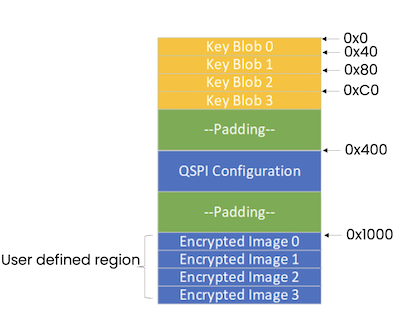
2.1 OTFAD Key Scrambling#
Key scrambling is an encryption algorithm designed to obfuscate the secret key information. It is an optional feature. When enabled, the OTFAD engine implements a key scrambling algorithm, wherein, the input OTFAD key is scrambled and then utilized to unwrap the key blobs containing the image encryption keys.
The OTFAD tool takes three inputs to scramble the OTFAD key:
OTFAD key: An OEM programmed input 128-bit key used to wrap/un-wrap the image encryption keys.
Key Scramble: An OEM programmed input 32-bit key used to scramble the input OTFAD key.
Key Scramble Align: An OEM programmed 8-bit key aligns value used along with Key Scramble in scrambling algorithm.
2.2 OTFAD Template#
The following command generates the template:
nxpimage otfad get-template -f mimx8ulp -o otfad_template.yaml
2.3 Exporting the OTFAD Image#
The following command exports the OTFAD image
nxpimage otfad export -f mimx8ulp -c otfad_template.yaml
%! nxpimage otfad export -c inputs/otfad_mx8ulp.yaml
nxpimage otfad export -c inputs/otfad_mx8ulp.yaml
Exporting OTFAD files
workspace/encrypted/OTFAD_Table.bin
workspace/encrypted/encrypted_blobs.bin
workspace/encrypted/readme.txt
3. Bootable Image with OTFAD encrypted image#
The following command merges the OTFAD image with the bootable image:
nxpimage -v utils binary-image export --config inputs/bimg.yaml --output workspace/encrypted_full_image.bin
We have to prepare the configuration.
%! nxpimage -v utils binary-image export --config inputs/bimg.yaml --output workspace/encrypted_full_image.bin
nxpimage -v utils binary-image export --config inputs/bimg.yaml --output workspace/encrypted_full_image.bin
INFO:spsdk.apps.nxpimage_apps.nxpimage_utils:Merged Image:
Name:      OTFAD encrypted AHAB image with FCB
Starts:    0x0
Ends:      0x2d7ff
Size:      Size: 182.0 kiB; 186,368 B
Alignment: 1 B
Execution Start Address: Not defined
Pattern:zeros

INFO:spsdk.apps.nxpimage_apps.nxpimage_utils:Merged Image:

┌──0x0000_0000─ OTFAD encrypted AHAB image with FCB ──┐
│             Size: 182.0 kiB; 186,368 B              │
│                   Pattern: zeros                    │
│┌──0x0000_0000─ OTFAD keyblob ──────────────────────┐│
││                    Size: 256 B                    ││
││              The image loaded from:               ││
││        workspace/encrypted/OTFAD_Table.bin        ││
││                  Pattern: zeros                   ││
││┌──0x0000_0000─ Segment 0 ────────────────────────┐││
│││                   Size: 256 B                   │││
│││                 Pattern: zeros                  │││
││└──0x0000_00ff────────────────────────────────────┘││
│└──0x0000_00ff──────────────────────────────────────┘│
│                     Gap: 768 B                      │
│┌──0x0000_0400─ FCB ────────────────────────────────┐│
││              Size: 2.0 kiB; 2,048 B               ││
││       The image loaded from: inputs/fcb.bin       ││
││                  Pattern: zeros                   ││
││┌──0x0000_0400─ Segment 0 ────────────────────────┐││
│││             Size: 2.0 kiB; 2,048 B              │││
│││                 Pattern: zeros                  │││
││└──0x0000_0bff────────────────────────────────────┘││
│└──0x0000_0bff──────────────────────────────────────┘│
│                    Gap: 1.0 kiB                     │
│┌──0x0000_1000─ OTFAD encrypted blob ───────────────┐│
││            Size: 178.0 kiB; 182,272 B             ││
││              The image loaded from:               ││
││      workspace/encrypted/encrypted_blobs.bin      ││
││                  Pattern: zeros                   ││
││┌──0x0000_1000─ Segment 0 ────────────────────────┐││
│││           Size: 178.0 kiB; 182,272 B            │││
│││                 Pattern: zeros                  │││
││└──0x0002_d7ff────────────────────────────────────┘││
│└──0x0002_d7ff──────────────────────────────────────┘│
└──0x0002_d7ff────────────────────────────────────────┘

Success. (Merged image: workspace/encrypted_full_image.bin created in BIN format.)
4. Program OTFAD Fuses#
The Following fuses need to be programmed to enable the OTFAD feature:
Fuse |
Location |
|---|---|
OTFAD_ENABLE |
Bank 23, word 4, bit 3 |
OTFAD_KEY[127:0] |
Bank 23, word 0~3 |
OTFAD1_KEY_SCRAMBLE_EN |
Bank 23, word 4, bit 7 |
OTFAD1_KEY_SCRAMBLE_ALIGN[7:0] |
Bank 23, word 4, bit 8~15 |
OTFAD1_KEY_SCRAMBLE[31:0] |
Bank 23, word 7 |
4.2 Program OTFAD Fuses using the U-Boot CLI#
Another option is to use the U-Boot CLI interface and fuse prog command
u-boot=> fuse prog -y fuse_bank word fuse_value
4. Image download#
First we put the IMX8ULP-EVK into serial downloader mode and use nxpuuu to program the encrypted image to flexSPI.
We have to program the encrypted image to SPI NOR memory connected to flexSPI instance 0. We can do that with this script.
uuu_version 1.2.39


# This command will be run when ROM support stream mode
# i.MX8QXP, i.MX8QM
SDPS: boot -f ./inputs/imx-boot-imx8ulpevk-sd.bin-flash_singleboot.bin

# These commands will be run when use SPL and will be skipped if no spl
# if (SPL support SDPV)
# {
SDPV: delay 1000
SDPV: write -f ./inputs/imx-boot-imx8ulpevk-sd.bin-flash_singleboot.bin -skipspl
SDPV: jump
# }

FB: ucmd setenv fastboot_buffer ${loadaddr}
FB: download -f ./workspace/encrypted_full_image.bin
FB: ucmd setenv erase_unit 1000
FB: ucmd setexpr erase_size ${fastboot_bytes} + ${erase_unit}
FB: ucmd setexpr erase_size ${erase_size} / ${erase_unit}
FB: ucmd setexpr erase_size ${erase_size} * ${erase_unit}
FB: ucmd sf probe 0:0
FB[-t 100000]: ucmd sf erase 0 ${erase_size}
FB[-t 40000]: ucmd sf write ${fastboot_buffer} 0 ${fastboot_bytes}

FB: ucmd setenv fastboot_dev mmc
FB: ucmd setenv mmcdev ${emmc_dev}
FB: ucmd mmc dev ${emmc_dev}
FB: flash bootloader ./inputs/imx-boot-imx8ulpevk-sd.bin-flash_dualboot
FB: ucmd if env exists emmc_ack; then ; else setenv emmc_ack 0; fi;
FB: ucmd mmc partconf ${emmc_dev} ${emmc_ack} 1 0
FB: done
VERBOSITY = "-v"
%! nxpuuu $VERBOSITY script ./inputs/uuu_8ulpevk_dual.auto
nxpuuu -v script ./inputs/uuu_8ulpevk_dual.auto
SDPS: boot -f ./inputs/imx-boot-imx8ulpevk-sd.bin-flash_singleboot.bin


Success