
MCXE247 Secure Boot with SHE#
This notebook demonstrates how to set up secure boot on MCXE247 devices using the Secure Hardware Extension (SHE) module. The process includes:
Initial setup and loading of the flashloader
Loading of the master key and MAC key
BOOT_MAC configuration
Loading of the application
Secure boot verification
1. Introduction#
The Secure Hardware Extension (SHE) is an on-chip extension to any given microcontroller. It is intended to move the control over cryptographic keys from the software domain into the hardware domain and therefore protect those keys from software attacks.
Key Types and Their Functions#
The SHE specification defines the following key types:
MASTER_ECU_KEY: The highest privilege key that serves as the “root of trust” for the component. It can:
Reset the SHE module
Update any other key in the system
Only be updated with knowledge of the current MASTER_ECU_KEY
BOOT_MAC_KEY: Used by the secure boot mechanism to:
Verify software authenticity
Verify Message Authentication Codes (MACs)
Can be updated with knowledge of either the MASTER_ECU_KEY or current BOOT_MAC_KEY
BOOT_MAC: Stores the MAC of the bootloader for the secure boot mechanism. While not considered secret information, it’s treated like other keys for consistency and:
Is only accessible to the SHE booting mechanism
Can be updated with knowledge of either the MASTER_ECU_KEY or BOOT_MAC_KEY
KEY_<n>: General-purpose keys (minimum of 3, maximum of 17) that can be used for:
Encryption/decryption operations
MAC generation/verification
The specific function is determined at programming time via key usage flags
Can be updated with knowledge of either the MASTER_ECU_KEY or the current KEY_
Initial State#
An important security requirement is that all keys (MASTER_ECU_KEY, BOOT_MAC_KEY, BOOT_MAC, and KEY_
# Initialization cell

import os

from spsdk.utils.jupyter_utils import YamlDiffWidget

FAMILY = "mcxe247"
CONNECTION = "-p COM6"

WORKSPACE = "workspace/"  # change this to path to your workspace
INPUTS = "inputs/"
KEYS = "keys/"

FLASHLOADER = INPUTS + "flashloader.bin"
MASTER_KEY_PATH = KEYS + "master_key.hex"
MAC_KEY_PATH = KEYS + "mac_key.hex"

# This env variable sets colored logger output to STDOUT
%env JUPYTER_SPSDK=1
# Set a magic for command execution and echo
%alias execute echo %l && %l
%alias_magic ! execute

os.makedirs(WORKSPACE, exist_ok=True)
os.makedirs(KEYS, exist_ok=True)
env: JUPYTER_SPSDK=1
Created `%!` as an alias for `%execute`.
2. Device Preparation#
In this demo, we will be using FRDM-MCXE247 board: compact and scalable development board for rapid prototyping of MCX E245/246/247 MCUs.
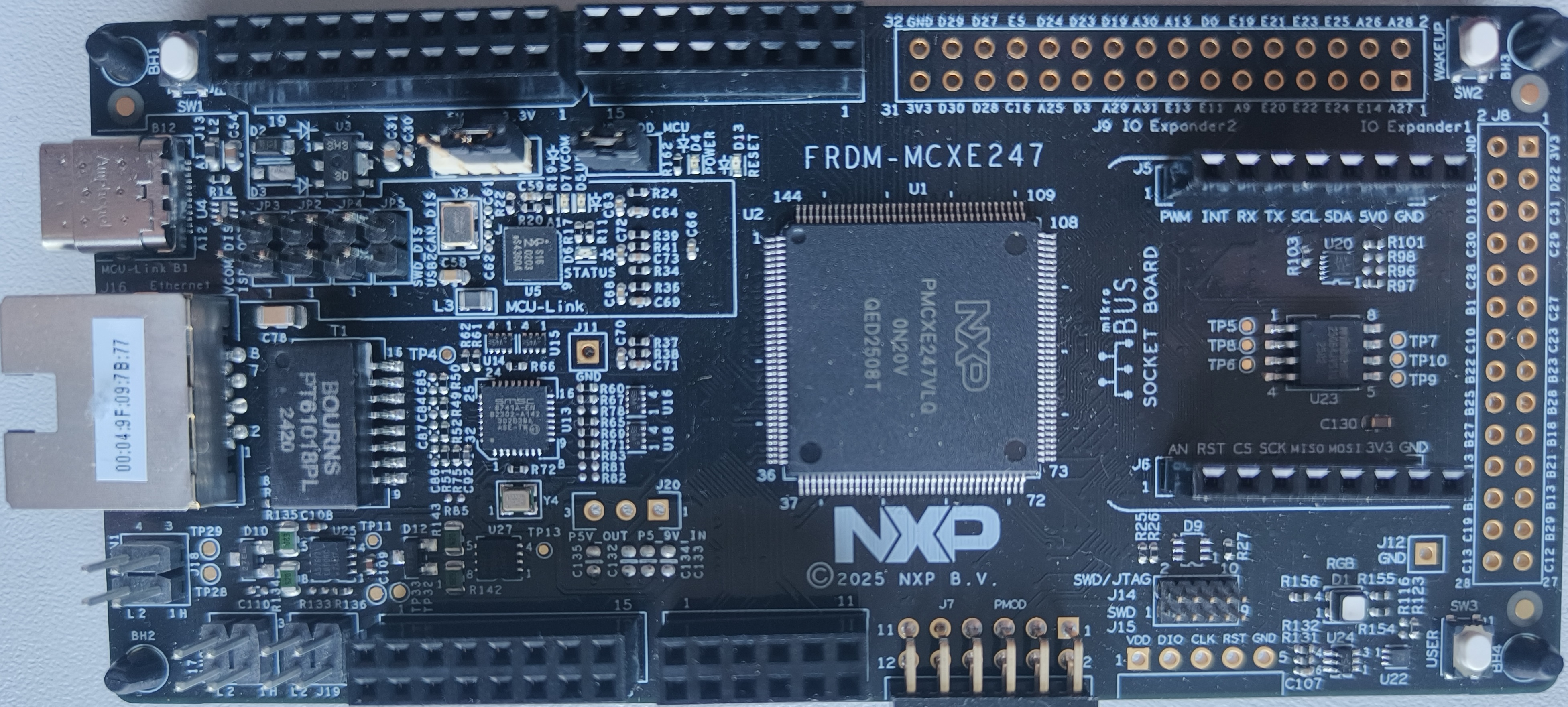
Connect the debug probe (like J-Link or MCU Link) to the FRDM-MCXE247 board and ensure proper USB connection. In this example I will be using on-board MCU Link debug probe.
3. Flashloader Setup#
Before we can program the device, we need to start the MCU flashloader: a configurable flash programming utility that operates over a serial connection on MCUs. It enables quick and easy programming of MCUs through the entire product life cycle.
%! LinkServer.exe run --exit-timeout 0 MCXE247 -a 0x1FFFE000 $FLASHLOADER
LinkServer.exe run --exit-timeout 0 MCXE247 -a 0x1FFFE000 inputs/flashloader.bin
INFO: Exact match for MCXE247 found
INFO: Selected device MCXE247:
INFO: Getting available probes
INFO: Selected probe #1 LXQGWZJCWHMAC (MCU-LINK on-board (r2E4) CMSIS-DAP V3.156)
Let’s check if the MCXE247 device is connected to the PC. We’ll use nxpdevscan to detect the device.
# Check if the device is connected and detected by PC
%! nxpdevscan -p
nxpdevscan -p
-------- Connected NXP UART Devices --------

Port: COM6
Type: mboot device
4. Key Generation#
Required AES-128 Keys The secure boot process requires two specific AES-128 keys:
MASTER_ECU_KEY: Primary key
BOOT_MAC_KEY: Key used checking the application integrity during secure boot
About AES-128#
AES-128 (Advanced Encryption Standard with 128-bit key length) is a robust symmetric encryption algorithm commonly implemented in security-critical applications. Each key consists of 16 bytes (128 bits) of data.
For implementation purposes, we’ll be utilizing pre-generated keys rather than generating them dynamically.
print(f"Master Key exists: {os.path.exists(MASTER_KEY_PATH)}")
print(f"BOOT_MAC Key exists: {os.path.exists(MAC_KEY_PATH)}")
Master Key exists: True
BOOT_MAC Key exists: True
5. Preparing the Master Boot Image (MBI)#
# Get difference of template and user YAML configuration
YamlDiffWidget("inputs/mcxe247_mbi.diffc").html
5.1 Programming the Application#
%! nxpimage mbi export -c inputs/mcxe247_xip_plain.yaml
%! blhost $CONNECTION flash-erase-region 0 8192
%! blhost $CONNECTION -j -- write-memory 0x00000000 workspace/mcxe247_mbi_led_blinky.bin
nxpimage mbi export -c inputs/mcxe247_xip_plain.yaml
Success. (Master Boot Image: workspace/mcxe247_mbi_led_blinky.bin created.)
blhost -p COM6 flash-erase-region 0 8192
Response status = 0 (0x0) Success.
blhost -p COM6 -j -- write-memory 0x00000000 workspace/mcxe247_mbi_led_blinky.bin
{
   "command": "write-memory",
   "response": [
      5552
   ],
   "status": {
      "description": "0 (0x0) Success.",
      "value": 0
   }
}
6. SHE Module Configuration#
Now we’ll configure the SHE module with our pre-generated keys. This includes loading the Master Key, MEC Key, and setting up the MAC configuration.
6.1 Setup#
Setup SHE key storage configuration for secure boot.
%! LinkServer.exe run --exit-timeout 0  MCXE247 -a 0x1FFFE000 $FLASHLOADER
%! nxpshe setup -k 20 $CONNECTION -f mcxe247
LinkServer.exe run --exit-timeout 0 MCXE247 -a 0x1FFFE000 inputs/flashloader.bin
INFO: Exact match for MCXE247 found
INFO: Selected device MCXE247:
INFO: Getting available probes
INFO: Selected probe #1 LXQGWZJCWHMAC (MCU-LINK on-board (r2E4) CMSIS-DAP V3.156)
nxpshe setup -k 20 -p COM6 -f mcxe247
Configuring SHE key storage with max keys: 20
Setting SHE flash partition property
Enrolling SHE key storage
Resetting the device
SHE key storage configuration setup completed successfully.
6.2 Master ECU key#
The MASTER_ECU_KEY is intended to be populated by the “owner” of the component using SHE and it can be used to reset SHE or change any of the other keys. The MASTER_ECU_KEY is only used for updating other memory slots inside of SHE.
A new MASTER_ECU_KEY can be written with the knowledge of the current MASTER_ECU_KEY and is protected by the common lock mechanisms.
The MASTER_ECU_KEY must be empty after production.
# Get difference of template and user YAML configuration
YamlDiffWidget("inputs/mcxe247_master_ecu_key.diffc").html
%! LinkServer.exe run --exit-timeout 0  MCXE247 -a 0x1FFFE000 $FLASHLOADER
%! nxpshe update $CONNECTION -c inputs/master_ecu_key_config.yaml
LinkServer.exe run --exit-timeout 0 MCXE247 -a 0x1FFFE000 inputs/flashloader.bin
INFO: Exact match for MCXE247 found
INFO: Selected device MCXE247:
INFO: Getting available probes
INFO: Selected probe #1 LXQGWZJCWHMAC (MCU-LINK on-board (r2E4) CMSIS-DAP V3.156)
nxpshe update -p COM6 -c inputs/master_ecu_key_config.yaml
Sending update message to device
Response status = 0 (0x0) Success.
Updating key ID: 1 was successful.
6.3 Boot MAC key#
The BOOT_MAC_KEY is used by the secure booting mechanism to verify the authenticity of the software. The BOOT_MAC_KEY may also be used to verify a MAC.
# Get difference of template and user YAML configuration
YamlDiffWidget("inputs/mcxe247_boot_mac_key.diffc").html
%! nxpshe update $CONNECTION -c inputs/boot_mac_key_config.yaml
nxpshe update -p COM6 -c inputs/boot_mac_key_config.yaml
Sending update message to device
Response status = 0 (0x0) Success.
Updating key ID: 2 was successful.
7. BOOT_MAC calculation#
The BOOT_MAC is required for the secure boot mechanism and is therefore stored inside of SHE. It is not considered to be a secret information, however, it is treated like any other key inside of SHE for the ease of use. The BOOT_MAC is used to store the MAC of the Bootloader of the secure booting mechanism and may only be accessible to the booting mechanism of SHE.
The BOOT_MAC can be written with the knowledge of the MASTER_ECU_KEY or BOOT_MAC_KEY and is protected by the common lock mechanism. The BOOT_MAC must be empty after production.
7.1 Boot modes#
MCX E24x devices support three secure boot modes.
Sequential Boot Mode: In this mode, after RESET, the flash system comes out of RESET and the core stays in RESET or can execute. The secure boot process verifies the application firmware block. If secure boot is successful then the keys will be made available for security tasks, otherwise keys marked as boot protected will be blocked for all tasks. Lastly, the core starts executing application firmware.
Strict Sequential Boot Mode: In this mode, after RESET, the flash system comes out of RESET and the core stays in RESET or can execute from ROM code. The secure boot process verifies the application firmware block. If secure boot is successful then the keys will be made available for security tasks. Otherwise, if CMAC comparison fails then main core stays in RESET (hence no application firmware is executed) or may execute ROM code.
NOTE

This boot mode is irreversible; that means once set, boot mode cannot be changed to the other boot modes.
Before setting this mode BOOT_MAC must be calculated and stored, otherwise the device will remain in RESET. (Automatic BOOT_MAC calculation does not run in this mode.)
Parallel Boot Mode: In this mode, after RESET, the flash system and the main core come out of RESET and main core starts executing application firmware. In parallel to the main core execution, CSEC verifies the application firmware block using the secure boot process. If secure boot is successful then the keys will be made available for security tasks, otherwise keys marked as boot protected will be blocked for all tasks. Main core can still execute the firmware
%! nxpshe calc-boot-mac $CONNECTION -k keys/mac_key.hex -d workspace/mcxe247_mbi_led_blinky.bin
%! nxpshe set-boot-mode -p COM6 -bm serial -d workspace/mcxe247_mbi_led_blinky.bin
nxpshe calc-boot-mac -p COM6 -k keys/mac_key.hex -d workspace/mcxe247_mbi_led_blinky.bin
Calculated Boot MAC: 2a71b6517a932c0dfd52f64652ddaea4
Boot MAC updated successfully.
nxpshe set-boot-mode -p COM6 -bm serial -d workspace/mcxe247_mbi_led_blinky.bin
Boot Mode updated successfully.
8. Reset and Boot#
Finally, reset the device to boot the secure application.
# Reset the device
%! blhost $CONNECTION reset

print("Device has been reset and should now boot securely.")
print(
    "If the MAC verification passes, the application will run and sets the bitfield in Flash EdgeLock Accelerator (CSEC) Status Register (FCSE_STAT) on offset 0x4002002C."
)
blhost -p COM6 reset
Response status = 0 (0x0) Success.
Device has been reset and should now boot securely.
If the MAC verification passes, the application will run and sets the bitfield in Flash EdgeLock Accelerator (CSEC) Status Register (FCSE_STAT) on offset 0x4002002C.
Conclusion#
This notebook has demonstrated the process of setting up secure boot on an MCXE247 device using the SHE module. The process includes:
Loading the flashloader
Preparing and programming the secure application
Generating and loading the MASTER_ECU_KEY, BOOT_MAC_KEY, and BOOT_MAC
Configuring the device for secure boot
With this configuration, the device will verify the integrity and authenticity of the firmware during boot, providing protection against unauthorized modifications.