
i.MX 93 AHAB with U-BOOT#
This notebook describes how to build a bootable AHAB image with ELE firmware and U-BOOT bootloader, and how to use NXPELE app.
Set up the environment#
SPSDK is needed with examples extension.
pip install spsdk[examples](Please refer to the installation documentation.)This demo was tested with i.MX93 EVK board
Images preparation#
to create resulting binary containing AHAB containers, we need to prepare the binaries
in this section we reproduce the process which is done by the
imx-mkimagetoolObtain all the necessary binaries (lpddr4 firmware, u-boot, bl31, ELE firmware) and put them into inputs directory
Requirements#
lpddr4 firmware files
u-boot binary (u-boot SPL and u-boot) built with AHAB support.
bl31.bin binary (ARM Trusted Firmware)
ELE firmware binary AHAB
i.MX93 EVK board
UUU tool
# This env variable sets colored logger output to STDOUT
# Execute this cell to enable execution of the ! line magic
%env JUPYTER_SPSDK=1
%alias execute echo %l && %l
%alias_magic ! execute
env: JUPYTER_SPSDK=1
Created `%!` as an alias for `%execute`.
AHAB Template#
We can generate the template using the nxpimage ahab get-template command. The command will generate a template. The template is a YAML file that contains the AHAB header and the AHAB container. The AHAB header contains the information about the image, such as the version, the number of containers, and the signature. The AHAB container contains the information about the image, such as the image type, the image version, the image size, and the image signature.
The following command generates the template:
nxpimage ahab get-template -f mx93 -o ahab_template.yaml
Exporting of the AHAB image#
The AHAB image can be exported using the nxpimage ahab export command. The command will create the AHAB image from the template. The following command creates the AHAB image:
nxpimage ahab export -c ahab_template.yaml
## Export AHAB Images

WORKSPACE = "workspace/"  # change this to path to your workspace

U_BOOT_SPL_CONTAINER_CONFIG = "u-boot-spl-container-img_config.yaml"
U_BOOT_ATF_CONTAINER_CONFIG = "u-boot-atf-container-img_config.yaml"
VERBOSITY = "-v"

# EXPORT U-BOOT SPL CONTAINER IMAGE
%! nxpimage $VERBOSITY ahab export -c $U_BOOT_SPL_CONTAINER_CONFIG
nxpimage -v ahab export -c u-boot-spl-container-img_config.yaml
INFO:spsdk.image.ahab.ahab_iae:Adding DDR memory areas into SPL image
INFO:spsdk.apps.nxpimage:Created AHAB Image:
Name:      AHAB Image
Starts:    0x0
Ends:      0x529ff
Size:      Size: 330.5 kiB; 338,432 B
Alignment: 8 B
Pattern:zeros
AHAB Image for mx93_a1

INFO:spsdk.apps.nxpimage:Created AHAB Image memory map:

+==0x0000_0000= AHAB Image ============================+
|              Size: 330.5 kiB; 338,432 B              |
|                AHAB Image for mx93_a1                |
|                    Pattern: zeros                    |
|+==0x0000_0000= AHAB Containers =====================+|
||               Size: 8.0 kiB; 8,192 B               ||
||               AHAB Containers block                ||
||                   Pattern: zeros                   ||
||+==0x0000_0000= AHAB Container 0 ==================+||
|||                   Size: 544 B                    |||
|||          AHAB Container for nxp_SWver:0          |||
||+==0x0000_021f=====================================+||
||                     Gap: 480 B                     ||
||+==0x0000_0400= AHAB Container 1 ==================+||
|||                   Size: 160 B                    |||
|||         AHAB Container for none_SWver:0          |||
||+==0x0000_049f=====================================+||
|+==0x0000_1fff=======================================+|
|+==0x0000_2000= Container 0 AHAB Data Image 0 =======+|
||              Size: 95.8 kiB; 98,144 B              ||
||   AHAB encrypted data block with ele Image Type.   ||
|+==0x0001_9f5f=======================================+|
|                      Gap: 160 B                      |
|+==0x0001_a000= U-Boot SPL with DDR tunning images ==+|
||             Size: 226.5 kiB; 231,936 B             ||
||    AHAB data block with executable Image Type.     ||
|+==0x0005_29ff=======================================+|
+==0x0005_29ff=========================================+

Success. (AHAB: outputs/u-boot-spl-container.img created.)
# EXPORT U-BOOT ATF CONTAINER IMAGE
%! nxpimage $VERBOSITY ahab export -c $U_BOOT_ATF_CONTAINER_CONFIG
nxpimage -v ahab export -c u-boot-atf-container-img_config.yaml
INFO:spsdk.apps.nxpimage:Created AHAB Image:
Name:      AHAB Image
Starts:    0x0
Ends:      0x1289ff
Size:      Size: 1.2 MiB; 1,214,976 B
Alignment: 8 B
Pattern:zeros
AHAB Image for mx93_a1

INFO:spsdk.apps.nxpimage:Created AHAB Image memory map:

+==0x0000_0000= AHAB Image ====================+
|          Size: 1.2 MiB; 1,214,976 B          |
|            AHAB Image for mx93_a1            |
|                Pattern: zeros                |
|+==0x0000_0000= AHAB Containers =============+|
||           Size: 8.0 kiB; 8,192 B           ||
||           AHAB Containers block            ||
||               Pattern: zeros               ||
||+==0x0000_0000= AHAB Container 0 ==========+||
|||               Size: 288 B                |||
|||     AHAB Container for none_SWver:0      |||
||+==0x0000_011f=============================+||
|+==0x0000_1fff===============================+|
|+==0x0000_2000= ATF - ARM Trusted Firmware ==+|
||          Size: 38.0 kiB; 38,912 B          ||
||AHAB data block with executable Image Type. ||
|+==0x0000_b7ff===============================+|
|+==0x0000_b800= U-Boot Firmware =============+|
||         Size: 1.1 MiB; 1,167,872 B         ||
||AHAB data block with executable Image Type. ||
|+==0x0012_89ff===============================+|
+==0x0012_89ff=================================+

Success. (AHAB: outputs/u-boot-atf-container.img created.)
AHAB Image Container set#
Now we have the AHAB image with U-Boot SPL DDR and AHAB Image with U-Boot ATF container. We can use the nxpimage binary-image merge command to merge the AHAB images into one binary image. The following command merges the AHAB images:
nxpimage -v bootable-image merge -c u-boot-flash_template.yaml -o flash.bin
U_BOOT_FLASH_BOOT_CFG = "u-boot-bootable.yaml"
U_BOOT_FLASH_BOOT = "outputs/flash.bin"
%! nxpimage -v bootable-image merge --config $U_BOOT_FLASH_BOOT_CFG --output $U_BOOT_FLASH_BOOT
nxpimage -v bootable-image merge --config u-boot-bootable.yaml --output outputs/flash.bin
INFO:spsdk.image.ahab.ahab_iae:Adding DDR memory areas into SPL image
INFO:spsdk.apps.nxpimage:Created Bootable Image:
Name:      Bootable Image for mx93
Starts:    0x0
Ends:      0x17b5ff
Size:      Size: 1.5 MiB; 1,553,920 B
Alignment: 1 B
Pattern:zeros
Memory type: serial_downloader
Revision: a1

INFO:spsdk.apps.nxpimage:Created Bootable Image memory map:

+==0x0000_0000= Bootable Image for mx93 =================+
|               Size: 1.5 MiB; 1,553,920 B               |
|      Memory type: serial_downloader Revision: a1       |
|                     Pattern: zeros                     |
|+==0x0000_0000= primary_image_container_set ===========+|
||              Size: 330.5 kiB; 338,432 B              ||
||                AHAB Image for mx93_a1                ||
||                    Pattern: zeros                    ||
||+==0x0000_0000= AHAB Containers =====================+||
|||               Size: 8.0 kiB; 8,192 B               |||
|||               AHAB Containers block                |||
|||                   Pattern: zeros                   |||
|||+==0x0000_0000= AHAB Container 0 ==================+|||
||||                   Size: 544 B                    ||||
||||          AHAB Container for nxp_SWver:0          ||||
|||+==0x0000_021f=====================================+|||
|||                     Gap: 480 B                     |||
|||+==0x0000_0400= AHAB Container 1 ==================+|||
||||                   Size: 160 B                    ||||
||||         AHAB Container for none_SWver:0          ||||
|||+==0x0000_049f=====================================+|||
||+==0x0000_1fff=======================================+||
||+==0x0000_2000= Container 0 AHAB Data Image 0 =======+||
|||              Size: 95.8 kiB; 98,144 B              |||
|||   AHAB encrypted data block with ele Image Type.   |||
||+==0x0001_9f5f=======================================+||
||                      Gap: 160 B                      ||
||+==0x0001_a000= U-Boot SPL with DDR tunning images ==+||
|||             Size: 226.5 kiB; 231,936 B             |||
|||    AHAB data block with executable Image Type.     |||
||+==0x0005_29ff=======================================+||
|+==0x0005_29ff=========================================+|
|                       Gap: 512 B                       |
|+==0x0005_2c00= secondary_image_container_set =========+|
||              Size: 1.2 MiB; 1,214,976 B              ||
||                AHAB Image for mx93_a1                ||
||                    Pattern: zeros                    ||
||+==0x0005_2c00= AHAB Containers =====================+||
|||               Size: 8.0 kiB; 8,192 B               |||
|||               AHAB Containers block                |||
|||                   Pattern: zeros                   |||
|||+==0x0005_2c00= AHAB Container 0 ==================+|||
||||                   Size: 288 B                    ||||
||||         AHAB Container for none_SWver:0          ||||
|||+==0x0005_2d1f=====================================+|||
||+==0x0005_4bff=======================================+||
||+==0x0005_4c00= ATF - ARM Trusted Firmware ==========+||
|||              Size: 38.0 kiB; 38,912 B              |||
|||    AHAB data block with executable Image Type.     |||
||+==0x0005_e3ff=======================================+||
||+==0x0005_e400= U-Boot Firmware =====================+||
|||             Size: 1.1 MiB; 1,167,872 B             |||
|||    AHAB data block with executable Image Type.     |||
||+==0x0017_b5ff=======================================+||
|+==0x0017_b5ff=========================================+|
+==0x0017_b5ff===========================================+

Success. (Bootable Image: outputs/flash.bin created)
Image download#
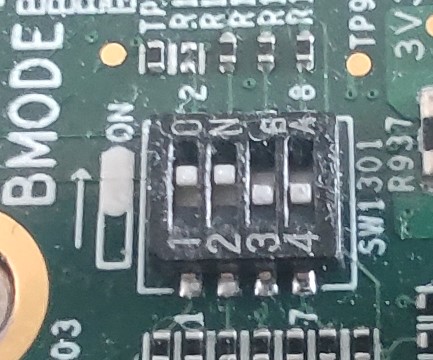
First we put the iMX93 into serial downloader mode for Cortex-A (0011), and use uuu to upload the flash.bin containing U-Boot and other firmware.
The picture below shows the desired DIP switch configuration for flashing Cortex-A:
%! uuu -b emmc outputs/flash.bin
NXPELE#
NXPELE is a tool that can communicate with the EdgeLock enclave. It might be used for example for writing and reading the fuses and keyblob generation.
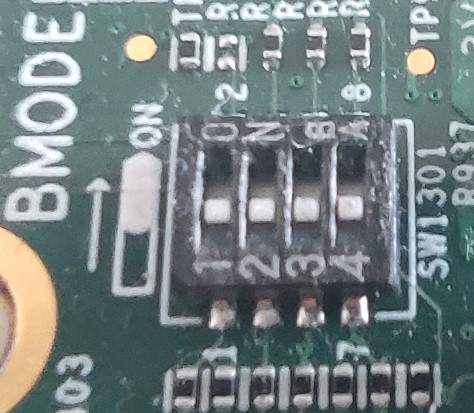
To communicate with the iMX93, we need to set it into eMMC boot for Cortex-A (0000), then find out the serial port for the U-Boot console, and stop the autoboot. In later version of SPSDK, it might be possible to do that automatically.
The picture below shows the desired DIP switch configuration for booting from Cortex-A:
%! nxpele -f mx93 -p COM30 get-info
nxpele -f mx93 -p COM30 get-info
ELE get info ends successfully:
Command:          0xda
Version:          1
Length:           92
SoC ID:           9300
SoC version:      A000
Life Cycle:       OEM_OPEN - 0x0010
SSSM state:       4
UUID:             f2a60176ff3044479bf0679973c69791
SHA256 ROM PATCH: 0563db6df6388ec7f5b2bba52110bebdfa0302b6e3a39493e03c7c9be7ab8686
SHA256 FW:        4d352fbbd4ecaac4359847e98f7851ac3f05e105005363ed5ff244b2a64176e9
%! nxpele -f mx93 -p COM30 generate-keyblob DEK -a AES_CBC --key-id 0 --key 00000000000000000000000000000000 --key-size 128
nxpele -f mx93 -p COM30 generate-keyblob DEK -a AES_CBC --key-id 0 --key 00000000000000000000000000000000 --key-size 128
ELE generate DEK key blob ends successfully:
0048008101100300ee3ce99c971d6ab7b5591ca1d0bdad386475f20ee57127ce177c5d6ee1a4abc68569dc7704925f0f83bf78b1951438284731728fa0bf8ea5c4c8cd4c0b669272