
Debug authentication on MCXN9XX#
Introduction#
The fundamental principles of debugging, which require access to the system state and system information, conflict with the principles of security, which require the restriction of access to assets. Thus, many products disable debug access completely before deploying the product. To address these challenges, the chip offers a debug authentication protocol as a mechanism to authenticate the debugger (an external entity) has the credentials approved by the product manufacturer before granting debug access to the device. The debug authentication is a challenge-response scheme and assures that only the debugger in possession of the required debug credentials can successfully authenticate over the debug interface and access restricted parts of the device.
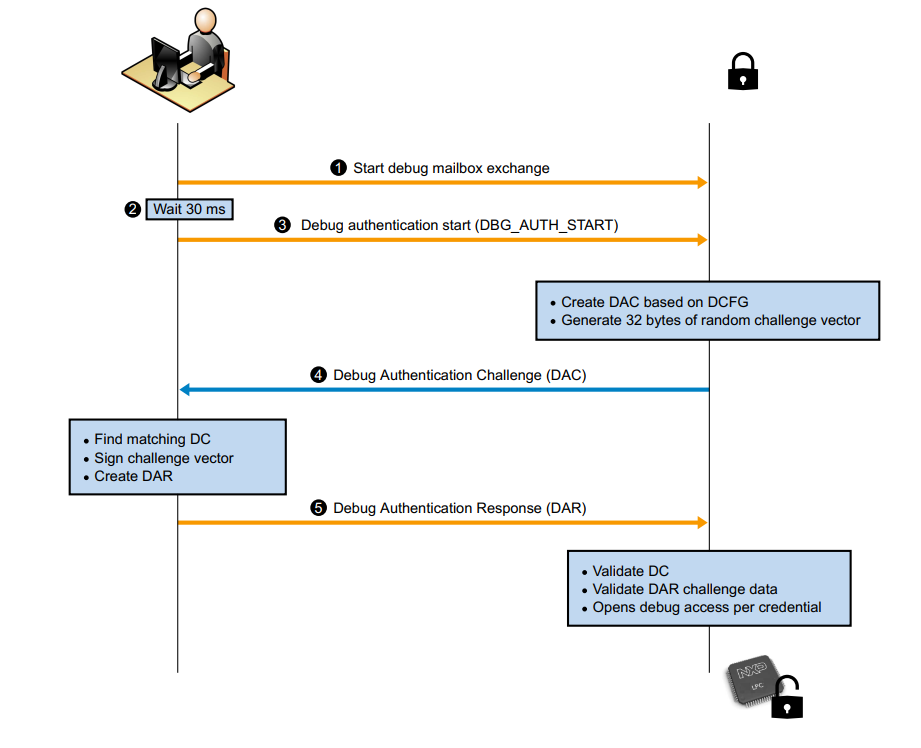
The protocol is divided into steps as described below:
The debugger initiates the Debug Mailbox message exchange by setting the CSW[RESYNCH_REQ] bit and CSW[CHIP_RESET_REQ] bit of DM-AP.
The debugger waits (minimum 30 ms) for the devices to restart and enter debug mailbox request handling loop.
The debugger sends Debug Authentication Start command (command code 10h) to the device.
The device responds back with Debug Authentication Challenge (DAC) packet based on the debug access rights preconfigured in CMPA fields, which are collectively referred as Device Credential Constraints Configuration (DCFG_CC). The response packet also contains a 32 bytes random challenge vector.
The debugger responds to the challenge with a Debug Authentication Response (DAR) message by using an appropriate debug certificate, matching the device identifier in the DAC. The DAR packet contains the debug access permission certificate, also referred as Debug Credential (DC), and a cryptographic signature binding the DC and the challenge vector provided in the DAC.
The device on receiving the DAR, validates the contents by verifying the cryptographic signature of the message using the debugger’s public key present in the embedded the Debug Credential (DC). On successful validation of DAR, the device enables access to the debug domains permitted in the DC
WARNING! :warning:#
This configuration is used only for demonstration purpose. For final security device configuration go through all configuration possibilities and define your own specific config/keys.
Let’s prepare the environment#
%run ../init_notebook.ipynb

import os

WORKSPACE = "workspace/"  # change this to path to your workspace
KEYS = "../_data/keys/ecc256/"  # change this to path to your keys
INPUTS = "inputs/"
VERBOSITY = (
    ""  # verbosity of commands, might be -v or -vv for debug or blank for no additional info
)
# choose family
FAMILY = "mcxn9xx"
INTERFACE = "pyocd"
env: JUPYTER_SPSDK=1
Created `%!` as an alias for `%execute`.
Device preparation#
Now it’s time to prepare the device. In this example we will use FRDM-MCXN947 board. This is example board configuration without external debugger. It is also possible to use configuration with external debugger such as JLink debug probe.
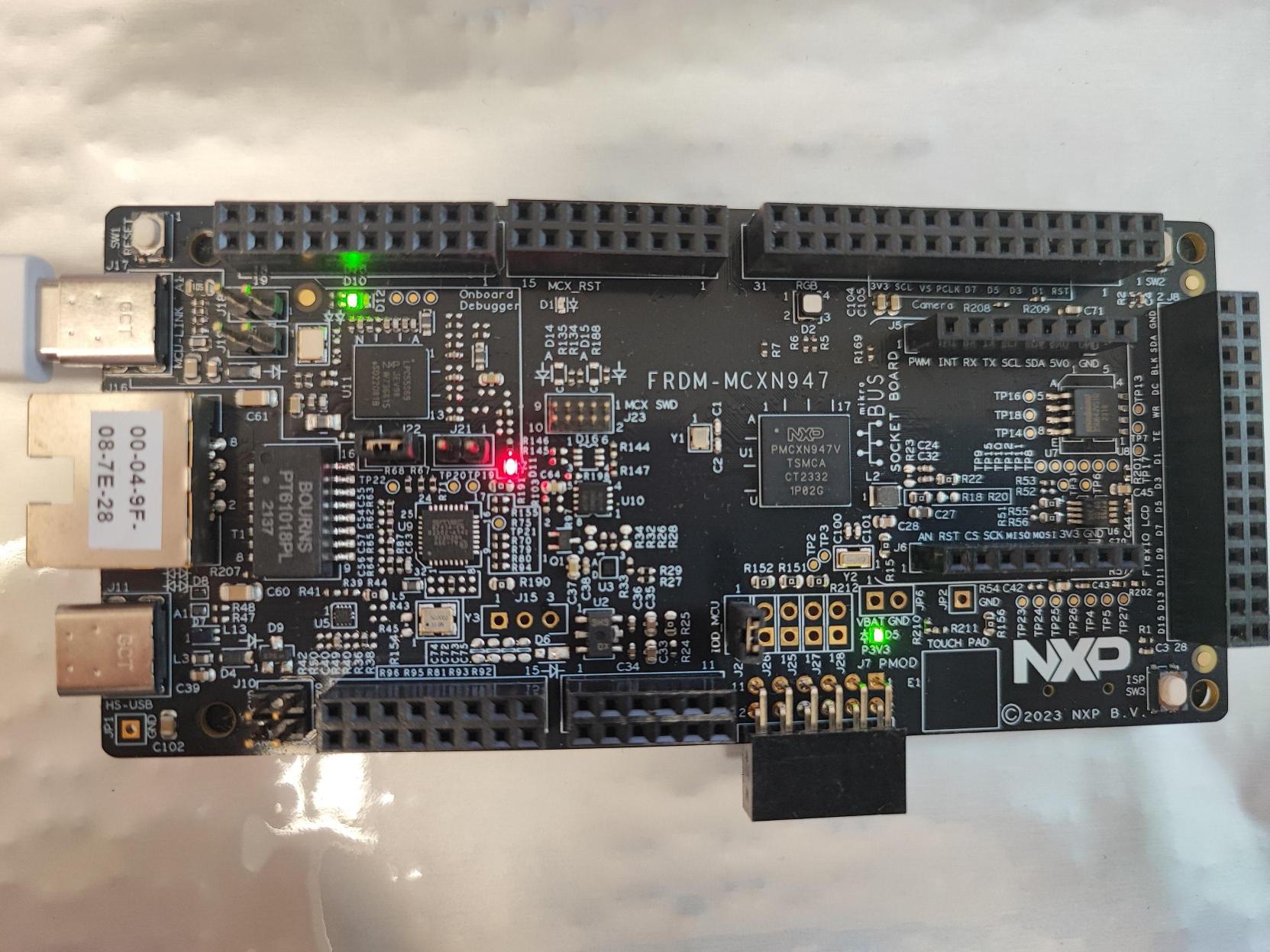
Prepare device, erase previous settings and use app nxpdevscan to check if the device is connected to the PC in ISP mode.
# prepare the board so that there is no previous settings
%! nxpdebugmbox -i $INTERFACE erase
# enter ISP mode
%! nxpdebugmbox -i $INTERFACE ispmode -m 0
# check if the device is connected and detected by PC
%! nxpdevscan
nxpdebugmbox -i pyocd erase
  #   Interface   Id              Description
------------------------------------------------------------------------------------------------
  0   PyOCD       QYEMBT5PFP4HU   NXP Semiconductors MCU-LINK on-board (r0E7) CMSIS-DAP V3.108
Mass flash erase succeeded
nxpdebugmbox -i pyocd ispmode -m 0
  #   Interface   Id              Description
------------------------------------------------------------------------------------------------
  0   PyOCD       QYEMBT5PFP4HU   NXP Semiconductors MCU-LINK on-board (r0E7) CMSIS-DAP V3.108
Entering into ISP mode succeeded
nxpdevscan
-------- Connected NXP USB Devices --------

LPCSIO - NXP Semiconductors
Vendor ID: 0x1fc9
Product ID: 0x0143
Path: HID\VID_1FC9&PID_0143&MI_04\7&359DC1D7&0&0000
Path Hash: dc8b8fe1
Name: kw45xx | k32w1xx
Serial number: QYEMBT5PFP4HU

MCU-LINK NXP TRACE - NXP Semiconductors
Vendor ID: 0x1fc9
Product ID: 0x0143
Path: HID\VID_1FC9&PID_0143&MI_01\7&3F292E3&0&0000
Path Hash: 08030e5a
Name: kw45xx | k32w1xx
Serial number: QYEMBT5PFP4HU

-------- Connected NXP UART Devices --------

Port: COM8
Type: mboot device

-------- Connected NXP SIO Devices --------

LIBUSBSIO - NXP Semiconductors, LPCSIO
Vendor ID: 0x1fc9
Product ID: 0x0143
Path: HID\VID_1FC9&PID_0143&MI_04\7&359DC1D7&0&0000
Path Hash: dc8b8fe1
Serial number: QYEMBT5PFP4HU
Interface number: 4
Release number: 787
# choose USB or UART interface based on the result of nxpdevscan
# USB = "-u 0x1fc9,0x14f"
UART = "-p COM8"

# check if the board responds in ISP mode
%! blhost $UART get-property 1
# Response word 2 for get-property 17 is LC_STATE.
%! blhost $UART get-property 17
blhost -p COM8 get-property 1
Response status = 0 (0x0) Success.
Response word 1 = 1258488320 (0x4b030200)
Current Version = K3.2.0
blhost -p COM8 get-property 17
Response status = 0 (0x0) Success.
Response word 1 = 1520786085 (0x5aa55aa5)
Response word 2 = 1 (0x1)
Security State = UNSECURE
Generate RoT + Debug auth keys#
First we need to generate Root of Trust Keys (RoTKs)/Super Root Keys (SRKs), Debug Credential Key (DCK) and Image Signing Key (ISK). In this example, we will use nxpcrypto app to generate secp256r1 keys (see How-to-get-keys-using-nxpcrypto). Script by default load 4 RoTKs, 1 DCK and 1 ISK. Feel free to modify it according your needs. At least one RoTK is mandatory.
See the script’s comments and modify the script according to the application security requirements.
# load generated key pair for ROTK0
ROTK0_PRIVATE_KEY_PATH = KEYS + "srk0_ecc256.pem"
ROTK0_PUBLIC_KEY_PATH = KEYS + "srk0_ecc256.pub"
# verify that keys were loaded
assert os.path.exists(ROTK0_PRIVATE_KEY_PATH)
assert os.path.exists(ROTK0_PUBLIC_KEY_PATH)

# load generated key pair for ROTK1
ROTK1_PRIVATE_KEY_PATH = KEYS + "srk1_ecc256.pem"
ROTK1_PUBLIC_KEY_PATH = KEYS + "srk1_ecc256.pub"
# verify that keys were loaded
assert os.path.exists(ROTK1_PRIVATE_KEY_PATH)
assert os.path.exists(ROTK1_PUBLIC_KEY_PATH)

# load generated key pair for ROTK2
ROTK2_PRIVATE_KEY_PATH = KEYS + "srk2_ecc256.pem"
ROTK2_PUBLIC_KEY_PATH = KEYS + "srk2_ecc256.pub"
# verify that keys were loaded
assert os.path.exists(ROTK2_PRIVATE_KEY_PATH)
assert os.path.exists(ROTK2_PUBLIC_KEY_PATH)

# load generated key pair for ROTK3
ROTK3_PRIVATE_KEY_PATH = KEYS + "srk3_ecc256.pem"
ROTK3_PUBLIC_KEY_PATH = KEYS + "srk3_ecc256.pub"
# verify that keys were loaded
assert os.path.exists(ROTK3_PRIVATE_KEY_PATH)
assert os.path.exists(ROTK3_PUBLIC_KEY_PATH)

# load generated key pair for DCK
DCK_PRIVATE_KEY_PATH = KEYS + "dck_ecc256.pem"
DCK_PUBLIC_KEY_PATH = KEYS + "dck_ecc256.pub"
# verify that keys were loaded
assert os.path.exists(DCK_PRIVATE_KEY_PATH)
assert os.path.exists(DCK_PUBLIC_KEY_PATH)

# load generated key pair for ISK
ISK_PRIVATE_KEY_PATH = KEYS + "imgkey_ecc256.pem"
ISK_PUBLIC_KEY_PATH = KEYS + "imgkey_ecc256.pub"
# verify that keys were loaded
assert os.path.exists(ISK_PRIVATE_KEY_PATH)
assert os.path.exists(ISK_PUBLIC_KEY_PATH)
Generate config files for debug auth#
First we need to generate template for debug credentials configuration file.
DC_CONFIG_TEMPLATE_DEFAULT = WORKSPACE + "dc_config_default.yaml"
%! nxpdebugmbox get-template -f $FAMILY -o $DC_CONFIG_TEMPLATE_DEFAULT --force
assert os.path.exists(DC_CONFIG_TEMPLATE_DEFAULT)
nxpdebugmbox get-template -f mcxn9xx -o workspace/dc_config_default.yaml --force
The configuration template file has been created: workspace/dc_config_default.yaml
In order to generate the DC file, we need to modify yaml config accordingly:
DC_CONFIG_TEMPLATE = INPUTS + "dc_config.yaml"
assert os.path.exists(DC_CONFIG_TEMPLATE)
If UUID field is set, only the DC with matching device UUID can unlock.

Specify cc_socu that controls which debug domains are accessed via the authentication protocol.

Vendor Usage (cc_vu) can be leveraged by vendors in product-specific ways.

With credential beacon (cc_beacon), debug authentication can be restricted to specific parts having matching system product ID in OTP.

Define paths to the generated RoTKs/SRKs.

Define which RoTK will be the root of trust identifier <0, 1, 2, 3>.

Define path to the DCK.

Define path to the ROTK. RoT signature private key for the RoT meta chosen by rot_id to sign the image.

Optionally specify a sign_provider in format
type=<sp_type>;<key_number>=<rot_id>.

Now we generate dc file based on yaml configuration.
DC_FILE_PATH = WORKSPACE + "debug_auth.dc"
%! nxpdebugmbox -p 2.0 gendc -c $DC_CONFIG_TEMPLATE -o $DC_FILE_PATH --force
nxpdebugmbox -p 2.0 gendc -c inputs/dc_config.yaml -o workspace/debug_auth.dc --force
RKTH: e2cca7cf09a45d2f1942969fda1c68ecaad78fad416d143292dad2f618291ddd
Creating Debug credential file succeeded
Generate CMPA + CFPA config for debug authentication#
First create templates for CMPA and CFPA.
CFPA_CONFIG_TEMPLATE_DEFAULT = WORKSPACE + "cfpa_default_mcxn9xx_debug_auth.yaml"
CMPA_CONFIG_TEMPLATE_DEFAULT = WORKSPACE + "cmpa_default_mcxn9xx_debug_auth.yaml"
%! pfr get-template -t cfpa -f $FAMILY -o $CFPA_CONFIG_TEMPLATE_DEFAULT --force
%! pfr get-template -t cmpa -f $FAMILY -o $CMPA_CONFIG_TEMPLATE_DEFAULT --force
assert os.path.exists(CFPA_CONFIG_TEMPLATE_DEFAULT)
assert os.path.exists(CMPA_CONFIG_TEMPLATE_DEFAULT)
pfr get-template -t cfpa -f mcxn9xx -o workspace/cfpa_default_mcxn9xx_debug_auth.yaml --force
PFR cfpa configuration template has been created.
Result has been stored in: workspace/cfpa_default_mcxn9xx_debug_auth.yaml
pfr get-template -t cmpa -f mcxn9xx -o workspace/cmpa_default_mcxn9xx_debug_auth.yaml --force
PFR cmpa configuration template has been created.
Result has been stored in: workspace/cmpa_default_mcxn9xx_debug_auth.yaml
Now we need to modify yaml config accordingly for both CMPA and CFPA:
CFPA_CONFIG_TEMPLATE = INPUTS + "cfpa_mcxn9xx_debug_auth.yaml"
CMPA_CONFIG_TEMPLATE = INPUTS + "cmpa_mcxn9xx_debug_auth.yaml"
assert os.path.exists(CFPA_CONFIG_TEMPLATE)
assert os.path.exists(CMPA_CONFIG_TEMPLATE)
Change the value of the CFPA_PAGE_VERSION bitfield to
1to automatically increment +1 the page version of CFPA.

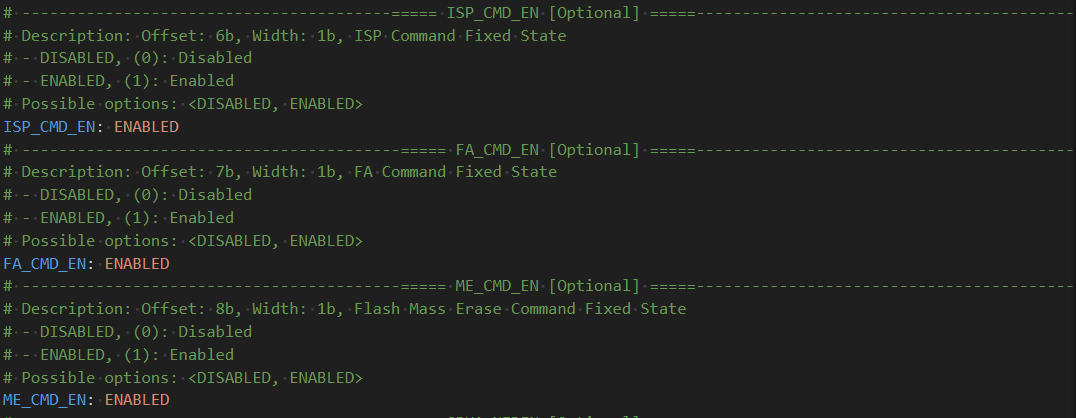
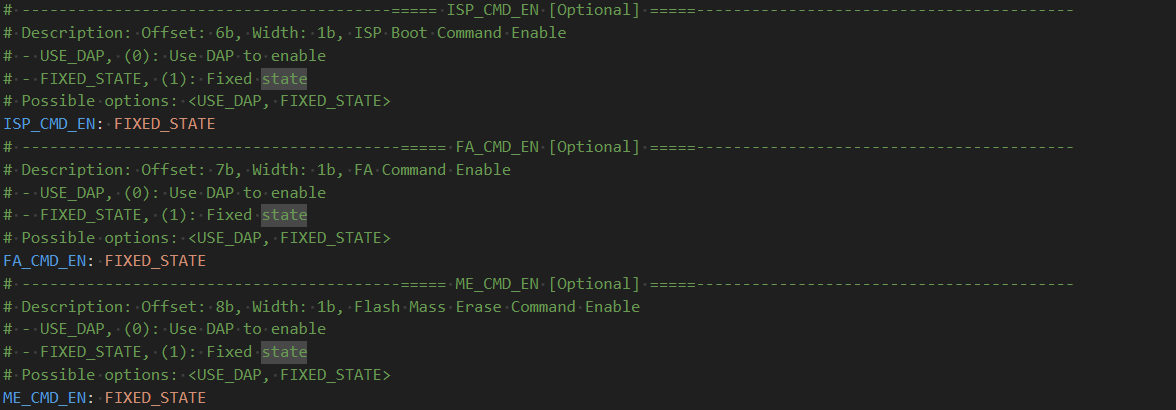
The following changes need to be made to both the CFPA and the CMPA. The changes concern registers defining Debug Credential Constraints for SoC specific Use.
This bitfield change in the DCFG_CC_SOCU_PIN:
This bitfield change in the DCFG_CC_SOCU_DFLT:
Generate final PFR binaries#
# Generate PFR binaries
CFPA_BINARY_OUTPUT = WORKSPACE + "cfpa_mcxn9xx.bin"
CMPA_BINARY_OUTPUT = WORKSPACE + "cmpa_mcxn9xx.bin"
MBI_CONFIG = INPUTS + "mcxn9xx_xip_signed.yaml"
%! pfr generate-binary -c $CFPA_CONFIG_TEMPLATE -o $CFPA_BINARY_OUTPUT
%! pfr generate-binary -c $CMPA_CONFIG_TEMPLATE -e $MBI_CONFIG -o $CMPA_BINARY_OUTPUT
pfr generate-binary -c inputs/cfpa_mcxn9xx_debug_auth.yaml -o workspace/cfpa_mcxn9xx.bin
WARNING:spsdk.pfr.pfr:The DCFG_CC_SOCU_NS_PIN register has been recomputed, because it has been used in configuration and the bitfield INVERSE_VALUE has not been specified (1981ms since start, pfr.py:196)
WARNING:spsdk.pfr.pfr:The DCFG_CC_SOCU_NS_DFLT register has been recomputed, because it has been used in configuration and the bitfield INVERSE_VALUE has not been specified (1981ms since start, pfr.py:196)
Success. (PFR binary has been generated)
Result has been stored in: workspace/cfpa_mcxn9xx.bin
pfr generate-binary -c inputs/cmpa_mcxn9xx_debug_auth.yaml -e inputs/mcxn9xx_xip_signed.yaml -o workspace/cmpa_mcxn9xx.bin
WARNING:spsdk.pfr.pfr:The DCFG_CC_SOCU_PIN register has been recomputed, because it has been used in configuration and the bitfield INVERSE_VALUE has not been specified (2402ms since start, pfr.py:196)
WARNING:spsdk.pfr.pfr:The DCFG_CC_SOCU_DFLT register has been recomputed, because it has been used in configuration and the bitfield INVERSE_VALUE has not been specified (2402ms since start, pfr.py:196)
Success. (PFR binary has been generated)
Result has been stored in: workspace/cmpa_mcxn9xx.bin
Load binary image + debug auth config into PFR#
IMAGE = INPUTS + "frdm_mcxn947_led_blinky.bin"
%! blhost $UART write-memory 0x0 $IMAGE

%! pfr write $UART -t cfpa -f $FAMILY -b $CFPA_BINARY_OUTPUT
%! pfr write $UART -t cmpa -f $FAMILY -b $CMPA_BINARY_OUTPUT

%! blhost $UART reset
blhost -p COM8 write-memory 0x0 inputs/frdm_mcxn947_led_blinky.bin
Writing memory
Response status = 0 (0x0) Success.
Response word 1 = 4072 (0xfe8)
pfr write -p COM8 -t cfpa -f mcxn9xx -b workspace/cfpa_mcxn9xx.bin
CFPA page address on mcxn9xx is 0x1000000
CFPA data written to device.
pfr write -p COM8 -t cmpa -f mcxn9xx -b workspace/cmpa_mcxn9xx.bin
CMPA page address on mcxn9xx is 0x1004000
CMPA data written to device.
blhost -p COM8 reset
Response status = 0 (0x0) Success.
Test debug authentication#
Now we can call authentication command for nxpdebugmbox. Since the board is in the LC=0x3, we need to set value for beacon in order to verify that the authentication truly succeeded. Let’s set beacon to 1.
%! nxpdebugmbox -v -p 2.0 -i $INTERFACE auth -b 1 -c $DC_FILE_PATH -k $DCK_PRIVATE_KEY_PATH
nxpdebugmbox -v -p 2.0 -i pyocd auth -b 1 -c workspace/debug_auth.dc -k ../_data/keys/ecc256/dck_ecc256.pem
INFO:spsdk.apps.nxpdebugmbox:Starting Debug Authentication
  #   Interface   Id              Description
------------------------------------------------------------------------------------------------
  0   PyOCD       QYEMBT5PFP4HU   NXP Semiconductors MCU-LINK on-board (r0E7) CMSIS-DAP V3.108
INFO:spsdk.debuggers.debug_probe_pyocd:PyOCD connected via MCU-LINK on-board (r0E7) CMSIS-DAP V3.108 probe.
INFO:spsdk.apps.nxpdebugmbox:DAC:
Version                : 2.0
SOCC                   : 0x00000007
UUID                   : 38303934423936500800000012000700
CC_VU                  : 0
ROTID_rkh_revocation   : 00000000
ROTID_rkth_hash        : e2cca7cf09a45d2f1942969fda1c68ecaad78fad416d143292dad2f618291ddd
CC_soc_pinned          : 00000000
CC_soc_default         : 00000000
Challenge              : 1e7d4c51f971faee191e47648dfa7dd8d58f8faf0e05b26f07f4f045a9883d51

INFO:spsdk.apps.nxpdebugmbox:DAR:
DAC:
Version                : 2.0
SOCC                   : 0x00000007
UUID                   : 38303934423936500800000012000700
CC_VU                  : 0
ROTID_rkh_revocation   : 00000000
ROTID_rkth_hash        : e2cca7cf09a45d2f1942969fda1c68ecaad78fad416d143292dad2f618291ddd
CC_soc_pinned          : 00000000
CC_soc_default         : 00000000
Challenge              : 1e7d4c51f971faee191e47648dfa7dd8d58f8faf0e05b26f07f4f045a9883d51

DC:
Version : 2.0
SOCC    : 0x00000007: mcxn23x[a0], mcxn54x[a1], mcxn94x[a1], mcxn9xx[a1]
UUID    : 00000000000000000000000000000000
CC_SOCC : 0xfff
CC_VU   : 0x0
BEACON  : 0
CRTK table has 4 entries
CRTK Hash: e2cca7cf09a45d2f1942969fda1c68ecaad78fad416d143292dad2f618291ddd
Authentication Beacon: 1

INFO:spsdk.debuggers.debug_probe_pyocd:PyOCD connected via MCU-LINK on-board (r0E7) CMSIS-DAP V3.108 probe.
Debug Authentication ends successfully.
Now read beacon from the memory. The value from the memory should have same values as -b parameter of nxpdebugmbox tool.
%! nxpdebugmbox -i $INTERFACE read-memory -a 0x40000FC0 -c 4
nxpdebugmbox -i pyocd read-memory -a 0x40000FC0 -c 4
  #   Interface   Id              Description
------------------------------------------------------------------------------------------------
  0   PyOCD       QYEMBT5PFP4HU   NXP Semiconductors MCU-LINK on-board (r0E7) CMSIS-DAP V3.108
00 00 01 00