
KW45xx and K32W1xx Secure Boot#
This notebook describes how to how to set up a basic secure boot on KW45xx/K32W1xx devices using the SPSDK command line utilities.
Keys preparation#
First we need to generate Root of Trust Keys (RoTKs)/Super Root Keys (SRKs) and optionally Image Signing Key (ISK). In this example, we will use nxpcrypto app to generate secp384r1 keys (see How-to-get-keys-using-nxpcrypto). Script by default load 4 RoTKs and 1 ISK. Feel free to modify it according your needs. At least one RoTK is mandatory.
See the script’s comments and modify the script according to the application security requirements.
Based on loaded keys, ROTK value is calculated and loaded in the device fuses so that’s why keys cannot be changed anymore for the device.
%run ../init_notebook.ipynb

import os
import pprint

import yaml

pp = pprint.PrettyPrinter(indent=4)

WORKSPACE = "workspace/"  # change this to path to your workspace
KEYS = "../_data/keys/ecc384/"  # change this to path to your keys
INPUTS = "inputs/"
VERBOSITY = (
    "-v"  # verbosity of commands, might be -v or -vv for debug or blank for no additional info
)
# choose family (kw45xx or k32w1xx)
FAMILY = "kw45xx"
env: JUPYTER_SPSDK=1
Created `%!` as an alias for `%execute`.
# load generated key pair for ROTK0
ROTK0_PRIVATE_KEY_PATH = KEYS + "srk0_ecc384.pem"
ROTK0_PUBLIC_KEY_PATH = KEYS + "srk0_ecc384.pub"
# verify that keys were loaded
assert os.path.exists(ROTK0_PRIVATE_KEY_PATH)
assert os.path.exists(ROTK0_PUBLIC_KEY_PATH)

# load generated key pair for ROTK1
ROTK1_PRIVATE_KEY_PATH = KEYS + "srk1_ecc384.pem"
ROTK1_PUBLIC_KEY_PATH = KEYS + "srk1_ecc384.pub"
# verify that keys were loaded
assert os.path.exists(ROTK1_PRIVATE_KEY_PATH)
assert os.path.exists(ROTK1_PUBLIC_KEY_PATH)

# load generated key pair for ROTK2
ROTK2_PRIVATE_KEY_PATH = KEYS + "srk2_ecc384.pem"
ROTK2_PUBLIC_KEY_PATH = KEYS + "srk2_ecc384.pub"
# verify that keys were loaded
assert os.path.exists(ROTK2_PRIVATE_KEY_PATH)
assert os.path.exists(ROTK2_PUBLIC_KEY_PATH)

# load generated key pair for ROTK3
ROTK3_PRIVATE_KEY_PATH = KEYS + "srk3_ecc384.pem"
ROTK3_PUBLIC_KEY_PATH = KEYS + "srk3_ecc384.pub"
# verify that keys were loaded
assert os.path.exists(ROTK3_PRIVATE_KEY_PATH)
assert os.path.exists(ROTK3_PUBLIC_KEY_PATH)

# load generated key pair for ISK
ISK_PRIVATE_KEY_PATH = KEYS + "imgkey_ecc384.pem"
ISK_PUBLIC_KEY_PATH = KEYS + "imgkey_ecc384.pub"
# verify that keys were loaded
assert os.path.exists(ISK_PRIVATE_KEY_PATH)
assert os.path.exists(ISK_PUBLIC_KEY_PATH)
Certificates preparation#
Generate self-signed x509 certificate(s) containing public key for private key generated in previous step (ROTKX). Application nxpcrypto will be used. First step is to get a template.
# obtain a template for root cert ROTK0
ROOT0_CERT_CONFIG_PATH = WORKSPACE + "cert0_template.yml"
%! nxpcrypto $VERBOSITY cert get-template -o $ROOT0_CERT_CONFIG_PATH --force

# obtain a template for root cert ROTK1
ROOT1_CERT_CONFIG_PATH = WORKSPACE + "cert1_template.yml"
%! nxpcrypto $VERBOSITY cert get-template -o $ROOT1_CERT_CONFIG_PATH --force

# obtain a template for root cert ROTK2
ROOT2_CERT_CONFIG_PATH = WORKSPACE + "cert2_template.yml"
%! nxpcrypto $VERBOSITY cert get-template -o $ROOT2_CERT_CONFIG_PATH --force

# obtain a template for root cert ROTK3
ROOT3_CERT_CONFIG_PATH = WORKSPACE + "cert3_template.yml"
%! nxpcrypto $VERBOSITY cert get-template -o $ROOT3_CERT_CONFIG_PATH --force

# obtain a template for root cert ISK
ISK_CERT_CONFIG_PATH = WORKSPACE + "sign_cert_template.yml"
%! nxpcrypto $VERBOSITY cert get-template -o $ISK_CERT_CONFIG_PATH --force
nxpcrypto -v cert get-template -o workspace/cert0_template.yml --force
INFO:spsdk.apps.nxpcertgen:Creating Certificate template...
The configuration template file has been created: workspace/cert0_template.yml
nxpcrypto -v cert get-template -o workspace/cert1_template.yml --force
INFO:spsdk.apps.nxpcertgen:Creating Certificate template...
The configuration template file has been created: workspace/cert1_template.yml
nxpcrypto -v cert get-template -o workspace/cert2_template.yml --force
INFO:spsdk.apps.nxpcertgen:Creating Certificate template...
The configuration template file has been created: workspace/cert2_template.yml
nxpcrypto -v cert get-template -o workspace/cert3_template.yml --force
INFO:spsdk.apps.nxpcertgen:Creating Certificate template...
The configuration template file has been created: workspace/cert3_template.yml
nxpcrypto -v cert get-template -o workspace/sign_cert_template.yml --force
INFO:spsdk.apps.nxpcertgen:Creating Certificate template...
The configuration template file has been created: workspace/sign_cert_template.yml
Configuration template for certificates should look like this:
# This is template for configuration file used for generating certificates

# ==============================================
# Issuer identification fields
# ==============================================
# All available option can be found within class NameOID in
# cryptography/src/cryptography/x509/oid.py at https://github.com/pyca/cryptography

issuer:
  COMMON_NAME: NXP
  COUNTRY_NAME: CZ
  LOCALITY_NAME: Roznov pod Radhostem
  STATE_OR_PROVINCE_NAME: Morava
  STREET_ADDRESS: 1.maje 1009
  ORGANIZATION_NAME: SPSDK Team

# ==============================================
# Subject identification fields
# ==============================================
# All available option can be found within class NameOID in
# cryptography/src/cryptography/x509/oid.py at https://github.com/pyca/cryptography
subject:
  COMMON_NAME: NXP - SPSDK
  COUNTRY_NAME: CZ
  LOCALITY_NAME: Roznov pod Radhostem
  STATE_OR_PROVINCE_NAME: Morava
  STREET_ADDRESS: 1.maje 1009
  ORGANIZATION_NAME: SPSDK Team
  POSTAL_CODE: 756 61

# ==============================================
# The certificate settings
# ==============================================

# Path, where issuer private key is stored
issuer_private_key: issuer_key.pem
# Path, where subject public key is stored
subject_public_key: subject_key.pub
# Serial number of certificate
serial_number: 12346578
# Validity duration in days
duration: 3650

# ==============================================
# Certificate basic extensions
# ==============================================
extensions:
  BASIC_CONSTRAINTS:
    # Delegate certificate as a signing authority to create an intermediate certificates.
    ca: false  # Valid values true|false
    # Integer length of the path of certificate signature from a given certificate, back to the root certificate
    path_length: 0
Certificates are in x.509 format and should be DER encoded.
ROOT_0_CERT_PATH = WORKSPACE + "ec_secp384r1_cert0.pem"
ROOT_1_CERT_PATH = WORKSPACE + "ec_secp384r1_cert1.pem"
ROOT_2_CERT_PATH = WORKSPACE + "ec_secp384r1_cert2.pem"
ROOT_3_CERT_PATH = WORKSPACE + "ec_secp384r1_cert3.pem"
ISK_CERT_PATH = WORKSPACE + "ec_secp384r1_sign_cert.pem"

# Fill the configuration file accordingly
assert os.path.exists(ROOT0_CERT_CONFIG_PATH)
assert os.path.exists(ROOT1_CERT_CONFIG_PATH)
assert os.path.exists(ROOT2_CERT_CONFIG_PATH)
assert os.path.exists(ROOT3_CERT_CONFIG_PATH)

# Create configuration for root certificate 0
with open(ROOT0_CERT_CONFIG_PATH) as cert_config:
    # load yaml configuration to dictionary
    cert = yaml.safe_load(cert_config)
    # change path to private and public keys
    cert["issuer_private_key"] = ROTK0_PRIVATE_KEY_PATH
    cert["subject_public_key"] = ROTK0_PUBLIC_KEY_PATH

with open(ROOT0_CERT_CONFIG_PATH, "w+") as cert_config:
    print("Root Certificate config:")
    pp.pprint(cert)
    # dump the dictionary back to YAML
    yaml.dump(cert, cert_config)

# Create configuration for root certificate 1
with open(ROOT1_CERT_CONFIG_PATH) as cert_config:
    # load yaml configuration to dictionary
    cert = yaml.safe_load(cert_config)
    # change path to private and public keys
    cert["issuer_private_key"] = ROTK1_PRIVATE_KEY_PATH
    cert["subject_public_key"] = ROTK1_PUBLIC_KEY_PATH

with open(ROOT1_CERT_CONFIG_PATH, "w+") as cert_config:
    print("Root Certificate config:")
    pp.pprint(cert)
    # dump the dictionary back to YAML
    yaml.dump(cert, cert_config)

# Create configuration for root certificate 2
with open(ROOT2_CERT_CONFIG_PATH) as cert_config:
    # load yaml configuration to dictionary
    cert = yaml.safe_load(cert_config)
    # change path to private and public keys
    cert["issuer_private_key"] = ROTK2_PRIVATE_KEY_PATH
    cert["subject_public_key"] = ROTK2_PUBLIC_KEY_PATH

with open(ROOT2_CERT_CONFIG_PATH, "w+") as cert_config:
    print("Root Certificate config:")
    pp.pprint(cert)
    # dump the dictionary back to YAML
    yaml.dump(cert, cert_config)

# Create configuration for root certificate 3
with open(ROOT3_CERT_CONFIG_PATH) as cert_config:
    # load yaml configuration to dictionary
    cert = yaml.safe_load(cert_config)
    # change path to private and public keys
    cert["issuer_private_key"] = ROTK3_PRIVATE_KEY_PATH
    cert["subject_public_key"] = ROTK3_PUBLIC_KEY_PATH

with open(ROOT3_CERT_CONFIG_PATH, "w+") as cert_config:
    print("Root Certificate config:")
    pp.pprint(cert)
    # dump the dictionary back to YAML
    yaml.dump(cert, cert_config)

# Create configuration for ISK certificate
with open(ISK_CERT_CONFIG_PATH) as cert_config:
    # load yaml configuration to dictionary
    cert = yaml.safe_load(cert_config)
    # change path to private and public keys
    cert["issuer_private_key"] = ISK_PRIVATE_KEY_PATH
    cert["subject_public_key"] = ISK_PUBLIC_KEY_PATH

with open(ISK_CERT_CONFIG_PATH, "w+") as cert_config:
    print("Root Certificate config:")
    pp.pprint(cert)
    # dump the dictionary back to YAML
    yaml.dump(cert, cert_config)


# Generate root certificates 0
%! nxpcrypto $VERBOSITY cert generate -c $ROOT0_CERT_CONFIG_PATH -o $ROOT_0_CERT_PATH --force
# Generate root certificates 1
%! nxpcrypto $VERBOSITY cert generate -c $ROOT1_CERT_CONFIG_PATH -o $ROOT_1_CERT_PATH --force
# Generate root certificates 2
%! nxpcrypto $VERBOSITY cert generate -c $ROOT2_CERT_CONFIG_PATH -o $ROOT_2_CERT_PATH --force
# Generate root certificates 3
%! nxpcrypto $VERBOSITY cert generate -c $ROOT3_CERT_CONFIG_PATH -o $ROOT_3_CERT_PATH --force

# Generate ISK certificate
%! nxpcrypto $VERBOSITY cert generate -c $ISK_CERT_CONFIG_PATH -o $ISK_CERT_PATH --force

# verify that certificates were generated
assert os.path.exists(ROOT_0_CERT_PATH)
assert os.path.exists(ROOT_1_CERT_PATH)
assert os.path.exists(ROOT_2_CERT_PATH)
assert os.path.exists(ROOT_3_CERT_PATH)
assert os.path.exists(ISK_CERT_PATH)
Root Certificate config:
{   'duration': 3650,
    'extensions': {'BASIC_CONSTRAINTS': {'ca': False, 'path_length': None}},
    'issuer': {   'COMMON_NAME': 'NXP',
                  'COUNTRY_NAME': 'CZ',
                  'LOCALITY_NAME': 'Roznov pod Radhostem',
                  'ORGANIZATION_NAME': 'SPSDK Team',
                  'STATE_OR_PROVINCE_NAME': 'Morava',
                  'STREET_ADDRESS': '1.maje 1009'},
    'issuer_private_key': 'workspace/_data/keys/ecc384/srk0_ecc384.pem',
    'serial_number': 12346578,
    'subject': {   'COMMON_NAME': 'NXP - SPSDK',
                   'COUNTRY_NAME': 'CZ',
                   'LOCALITY_NAME': 'Roznov pod Radhostem',
                   'ORGANIZATION_NAME': 'SPSDK Team',
                   'POSTAL_CODE': '756 61',
                   'STATE_OR_PROVINCE_NAME': 'Morava',
                   'STREET_ADDRESS': '1.maje 1009'},
    'subject_public_key': 'workspace/_data/keys/ecc384/srk0_ecc384.pub'}
Root Certificate config:
{   'duration': 3650,
    'extensions': {'BASIC_CONSTRAINTS': {'ca': False, 'path_length': None}},
    'issuer': {   'COMMON_NAME': 'NXP',
                  'COUNTRY_NAME': 'CZ',
                  'LOCALITY_NAME': 'Roznov pod Radhostem',
                  'ORGANIZATION_NAME': 'SPSDK Team',
                  'STATE_OR_PROVINCE_NAME': 'Morava',
                  'STREET_ADDRESS': '1.maje 1009'},
    'issuer_private_key': 'workspace/_data/keys/ecc384/srk1_ecc384.pem',
    'serial_number': 12346578,
    'subject': {   'COMMON_NAME': 'NXP - SPSDK',
                   'COUNTRY_NAME': 'CZ',
                   'LOCALITY_NAME': 'Roznov pod Radhostem',
                   'ORGANIZATION_NAME': 'SPSDK Team',
                   'POSTAL_CODE': '756 61',
                   'STATE_OR_PROVINCE_NAME': 'Morava',
                   'STREET_ADDRESS': '1.maje 1009'},
    'subject_public_key': 'workspace/_data/keys/ecc384/srk1_ecc384.pub'}
Root Certificate config:
{   'duration': 3650,
    'extensions': {'BASIC_CONSTRAINTS': {'ca': False, 'path_length': None}},
    'issuer': {   'COMMON_NAME': 'NXP',
                  'COUNTRY_NAME': 'CZ',
                  'LOCALITY_NAME': 'Roznov pod Radhostem',
                  'ORGANIZATION_NAME': 'SPSDK Team',
                  'STATE_OR_PROVINCE_NAME': 'Morava',
                  'STREET_ADDRESS': '1.maje 1009'},
    'issuer_private_key': 'workspace/_data/keys/ecc384/srk2_ecc384.pem',
    'serial_number': 12346578,
    'subject': {   'COMMON_NAME': 'NXP - SPSDK',
                   'COUNTRY_NAME': 'CZ',
                   'LOCALITY_NAME': 'Roznov pod Radhostem',
                   'ORGANIZATION_NAME': 'SPSDK Team',
                   'POSTAL_CODE': '756 61',
                   'STATE_OR_PROVINCE_NAME': 'Morava',
                   'STREET_ADDRESS': '1.maje 1009'},
    'subject_public_key': 'workspace/_data/keys/ecc384/srk2_ecc384.pub'}
Root Certificate config:
{   'duration': 3650,
    'extensions': {'BASIC_CONSTRAINTS': {'ca': False, 'path_length': None}},
    'issuer': {   'COMMON_NAME': 'NXP',
                  'COUNTRY_NAME': 'CZ',
                  'LOCALITY_NAME': 'Roznov pod Radhostem',
                  'ORGANIZATION_NAME': 'SPSDK Team',
                  'STATE_OR_PROVINCE_NAME': 'Morava',
                  'STREET_ADDRESS': '1.maje 1009'},
    'issuer_private_key': 'workspace/_data/keys/ecc384/srk3_ecc384.pem',
    'serial_number': 12346578,
    'subject': {   'COMMON_NAME': 'NXP - SPSDK',
                   'COUNTRY_NAME': 'CZ',
                   'LOCALITY_NAME': 'Roznov pod Radhostem',
                   'ORGANIZATION_NAME': 'SPSDK Team',
                   'POSTAL_CODE': '756 61',
                   'STATE_OR_PROVINCE_NAME': 'Morava',
                   'STREET_ADDRESS': '1.maje 1009'},
    'subject_public_key': 'workspace/_data/keys/ecc384/srk3_ecc384.pub'}
Root Certificate config:
{   'duration': 3650,
    'extensions': {'BASIC_CONSTRAINTS': {'ca': False, 'path_length': None}},
    'issuer': {   'COMMON_NAME': 'NXP',
                  'COUNTRY_NAME': 'CZ',
                  'LOCALITY_NAME': 'Roznov pod Radhostem',
                  'ORGANIZATION_NAME': 'SPSDK Team',
                  'STATE_OR_PROVINCE_NAME': 'Morava',
                  'STREET_ADDRESS': '1.maje 1009'},
    'issuer_private_key': 'workspace/_data/keys/ecc384/imgkey_ecc384.pem',
    'serial_number': 12346578,
    'subject': {   'COMMON_NAME': 'NXP - SPSDK',
                   'COUNTRY_NAME': 'CZ',
                   'LOCALITY_NAME': 'Roznov pod Radhostem',
                   'ORGANIZATION_NAME': 'SPSDK Team',
                   'POSTAL_CODE': '756 61',
                   'STATE_OR_PROVINCE_NAME': 'Morava',
                   'STREET_ADDRESS': '1.maje 1009'},
    'subject_public_key': 'workspace/_data/keys/ecc384/imgkey_ecc384.pub'}
nxpcrypto -v cert generate -c workspace/cert0_template.yml -o workspace/ec_secp384r1_cert0.pem --force
INFO:spsdk.apps.nxpcertgen:Generating Certificate...
INFO:spsdk.apps.nxpcertgen:Loading configuration from yml file...
INFO:spsdk.apps.nxpcertgen:Saving the generated certificate to the specified path...
INFO:spsdk.apps.nxpcertgen:Certificate generated successfully...
The certificate file has been created: workspace/ec_secp384r1_cert0.pem
nxpcrypto -v cert generate -c workspace/cert1_template.yml -o workspace/ec_secp384r1_cert1.pem --force
INFO:spsdk.apps.nxpcertgen:Generating Certificate...
INFO:spsdk.apps.nxpcertgen:Loading configuration from yml file...
INFO:spsdk.apps.nxpcertgen:Saving the generated certificate to the specified path...
INFO:spsdk.apps.nxpcertgen:Certificate generated successfully...
The certificate file has been created: workspace/ec_secp384r1_cert1.pem
nxpcrypto -v cert generate -c workspace/cert2_template.yml -o workspace/ec_secp384r1_cert2.pem --force
INFO:spsdk.apps.nxpcertgen:Generating Certificate...
INFO:spsdk.apps.nxpcertgen:Loading configuration from yml file...
INFO:spsdk.apps.nxpcertgen:Saving the generated certificate to the specified path...
INFO:spsdk.apps.nxpcertgen:Certificate generated successfully...
The certificate file has been created: workspace/ec_secp384r1_cert2.pem
nxpcrypto -v cert generate -c workspace/cert3_template.yml -o workspace/ec_secp384r1_cert3.pem --force
INFO:spsdk.apps.nxpcertgen:Generating Certificate...
INFO:spsdk.apps.nxpcertgen:Loading configuration from yml file...
INFO:spsdk.apps.nxpcertgen:Saving the generated certificate to the specified path...
INFO:spsdk.apps.nxpcertgen:Certificate generated successfully...
The certificate file has been created: workspace/ec_secp384r1_cert3.pem
nxpcrypto -v cert generate -c workspace/sign_cert_template.yml -o workspace/ec_secp384r1_sign_cert.pem --force
INFO:spsdk.apps.nxpcertgen:Generating Certificate...
INFO:spsdk.apps.nxpcertgen:Loading configuration from yml file...
INFO:spsdk.apps.nxpcertgen:Saving the generated certificate to the specified path...
INFO:spsdk.apps.nxpcertgen:Certificate generated successfully...
The certificate file has been created: workspace/ec_secp384r1_sign_cert.pem
Prepare MBI configuration file#
In order to generate MBI file, npximage tool is used. The nxpimage tool generates the MBI file according to the configuration file. Let’s create a template for MBI. Modify examples according your needs.
MBI_PATH = WORKSPACE + "MBI"
%! nxpimage $VERBOSITY mbi get-templates -f $FAMILY -o $MBI_PATH --force
# For K32W1XX device:
# %! nxpimage $VERBOSITY mbi get-templates -f $FAMILY -o $MBI_PATH --force
nxpimage -v mbi get-templates -f kw45xx -o workspace/MBI --force
Creating workspace/MBI/kw45xx_xip_plain.yaml template file.
Creating workspace/MBI/kw45xx_xip_crc.yaml template file.
Creating workspace/MBI/kw45xx_xip_signed.yaml template file.
Creating workspace/MBI/kw45xx_xip_nxp_signed.yaml template file.
For signed images, we need to create a certificate blok separately. In order to do this, use nxpimage cert-block get-template command as described below.
CERT_BLOCK_TEMPLATE_DEFAULT = WORKSPACE + "cert_block_default_kw45.yaml"
%! nxpimage $VERBOSITY cert-block get-template -f $FAMILY -o $CERT_BLOCK_TEMPLATE_DEFAULT --force
nxpimage -v cert-block get-template -f kw45xx -o workspace/cert_block_default_kw45.yaml --force
Creating workspace/cert_block_default_kw45.yaml template file.
In our case, we modified these items in the certification block configuration template:
CERT_BLOCK_TEMPLATE = INPUTS + "cert_block_kw45_secure.yaml"
assert os.path.exists(CERT_BLOCK_TEMPLATE)
Choose whether you want to use ISK. If so, define the path to the ISK public key.

Define paths to keys and choose index of main certification key.

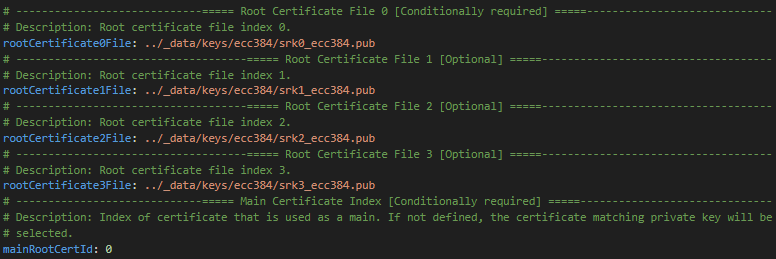
Define output path where certification block will be saved.

Our case does not require the definition of the following items, but it would be appropriate to consider their use for the given case.

Next, we modified the MBI XIP signed configuration template such as:
MBI_TEMPLATE = INPUTS + "kw45xx_xip_signed.yaml"
assert os.path.exists(MBI_TEMPLATE)
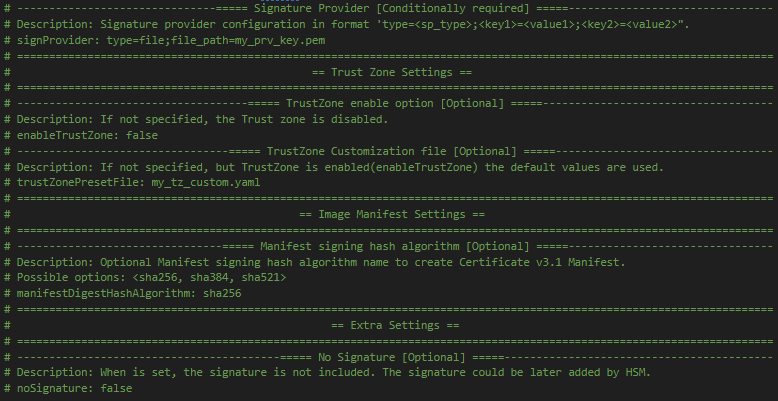
Define output path where final MBI XIP signed will be saved.

Define path to the plain image to be modified to MBI.

Define path to the certification block that was generated in previous step.

Define path to the ISK private key.

Our case does not require the definition of the following items, but it would be appropriate to consider their use for the given case.
MBI generation#
We have created certificates and keys required for the creation of MBI file. Let’s create a MBI.
MBI_OUTPUT_FILE = WORKSPACE + "kw45xx_mbi_xip_signed_hello_world.bin"
%! nxpimage mbi export -c $MBI_TEMPLATE
assert os.path.exists(MBI_OUTPUT_FILE)
nxpimage mbi export -c inputs/kw45xx_xip_signed.yaml
RKTH: 89e4983eb79bed26fc25cf6ba9b89ddb6727c80ed7c786a6f3c77c09bba0e832b468895926a6568031c0f955a614434e
Success. (Master Boot Image: workspace/kw45xx_mbi_xip_signed_hello_world.bin created.)
Device preparation#
Now it’s time to prepare the device. In this example we will use KW45xx-EVK/K32W1xx board.
First step is to enter ISP mode, this could be achieved by:
1 ) Put JP25 to (1-2)
2 ) Reset the board with SW4 pressed
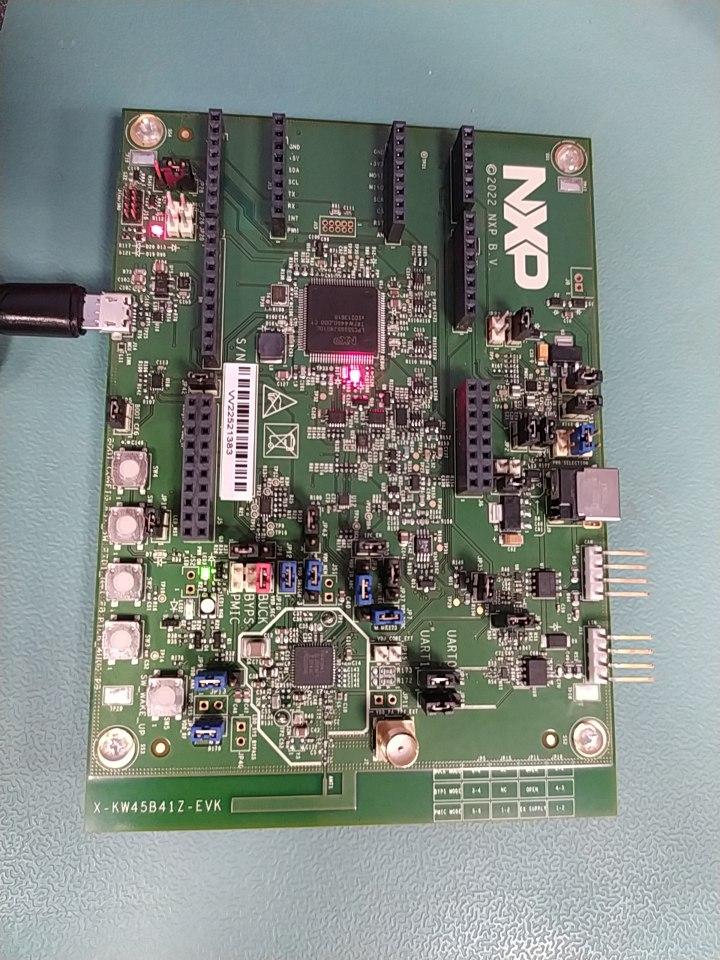

Use app nxpdevscan to check if the device is connected to the PC in ISP mode.
# check if the device is connected and detected by PC
%! nxpdevscan
nxpdevscan
-------- Connected NXP SDIO Devices --------

-------- Connected NXP USB Devices --------

-------- Connected NXP UART Devices --------

Port: COM10
Type: mboot device

-------- Connected NXP SIO Devices --------
# choose com port
UART_CONNECTION = "-p com10"

%! blhost $UART_CONNECTION get-property current-version
blhost -p com10 get-property current-version
Response status = 0 (0x0) Success.
Response word 1 = 1258488064 (0x4b030100)
Current Version = K3.1.0
Program device fuses with keys/RKTH generated in previous steps#
To program fuses blhost tool is used. Device needs to be in ISP mode, where it can communicate with blhost and process blhost commands. To serve the purpose of this document, ISP communication only over UART peripheral is considered for scripts. Also, accurate COMx port must be used.
WARNING!!! This step is destructive operation (burning fuses), be sure that you set value of RoTKH correctly in script as printed in output from nxpimage
# Increase voltage for fuse burning
blhost $UART_CONNECTION set-property 0x16 1

# Program RKTH (CUST_PROD_OEMFW_AUTH_PUK)
# Put value RKTH generated by nxpimage
%! blhost $UART_CONNECTION fuse-program 0x1F [[89e4983eb79bed26fc25cf6ba9b89ddb6727c80ed7c786a6f3c77c09bba0e832b468895926a6568031c0f955a614434e]]

# Set voltage to normal value
blhost $UART_CONNECTION set-property 0x16 0
Send MBI file to device#
Last step is to uploads MBI file with NBU image to device.
# uploads MBI
%! blhost $UART_CONNECTION write-memory 0x0 $MBI_OUTPUT_FILE
blhost -p com10 write-memory 0x0 workspace/MBI/my_mbi.bin
Writing memory
Response status = 0 (0x0) Success.
Response word 1 = 2904 (0xb58)
%! blhost $UART_CONNECTION reset
blhost -p com10 reset
Response status = 0 (0x0) Success.