
i.MXRT118x Debug Authentication example#
I.MX RT118x offers the Debug Authentication Protocol (DAP) as a mechanism to authenticate the debugger (an external entity) which has the credentials approved by the product manufacturer before granting the debug access to the device. This example demonstrates process how to establish Debug Authentication protocol.
The process could be split into following steps:
Introduction#
The fundamental principles of debugging, which require access to the system state and system information, conflict with the principles of security, which require the restriction of access to assets. Thus, many products disable debug access completely before deploying the product. To address these challenges, the chip offers a debug authentication protocol as a mechanism to authenticate the debugger (an external entity) has the credentials approved by the product manufacturer before granting debug access to the device. The debug authentication is a challenge-response scheme and assures that only the debugger in possession of the required debug credentials can successfully authenticate over the debug interface and access restricted parts of the device.
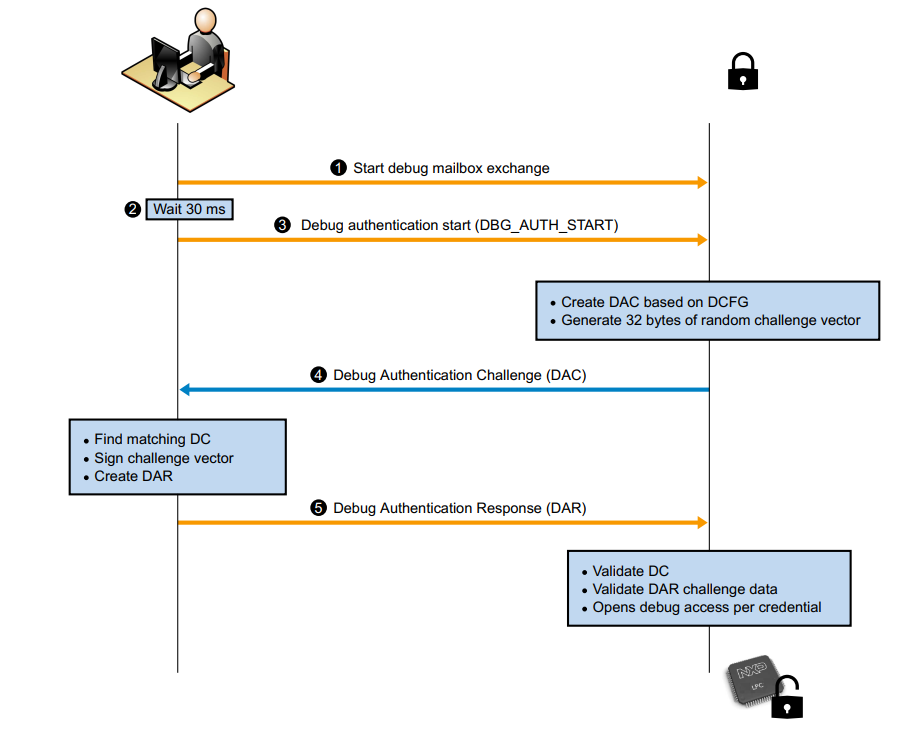
The protocol is divided into steps as described below:
The debugger initiates the Debug Mailbox message exchange by setting the CSW[RESYNCH_REQ] bit and CSW[CHIP_RESET_REQ] bit of DM-AP.
The debugger waits (minimum 30 ms) for the devices to restart and enter debug mailbox request handling loop.
The debugger sends Debug Authentication Start command (command code 10h) to the device.
The device responds back with Debug Authentication Challenge (DAC) packet based on the debug access rights preconfigured in CMPA fields, which are collectively referred as Device Credential Constraints Configuration (DCFG_CC). The response packet also contains a 32 bytes random challenge vector.
The debugger responds to the challenge with a Debug Authentication Response (DAR) message by using an appropriate debug certificate, matching the device identifier in the DAC. The DAR packet contains the debug access permission certificate, also referred as Debug Credential (DC), and a cryptographic signature binding the DC and the challenge vector provided in the DAC.
The device on receiving the DAR, validates the contents by verifying the cryptographic signature of the message using the debugger’s public key present in the embedded the Debug Credential (DC). On successful validation of DAR, the device enables access to the debug domains permitted in the DC
Prepare the Environment#
%run ../init_notebook.ipynb

import os
import pprint

pp = pprint.PrettyPrinter(indent=4)

WORKSPACE = "workspace/"  # change this to path to your workspace
INPUTS = "inputs/"
VERBOSITY = (
    "-v"  # verbosity of commands, might be -v or -vv for debug or blank for no additional info
)

DCK_KEY_PRIV = "../_data/keys/ecc256/dck_ecc256.pem"  # Private DCK key

DBGMAILBOX_TEMPLATE = (
    WORKSPACE + "nxpdebugmbox_template.yaml"
)  # Template for debug mailbox configuration
DBGMAILBOX_CONFIG = (
    INPUTS + "nxpdebugmbox_rt118x.yaml"
)  # yaml file with configuration used in this example

# DEBUGGER_PROBE = "pyocd" #onboard debugger on EVK-RT118x rev C
DEBUGGER_PROBE = "jlink"
# Only one probe can be connected to the board.
env: JUPYTER_SPSDK=1
Created `%!` as an alias for `%execute`.
EVK Board Overview#
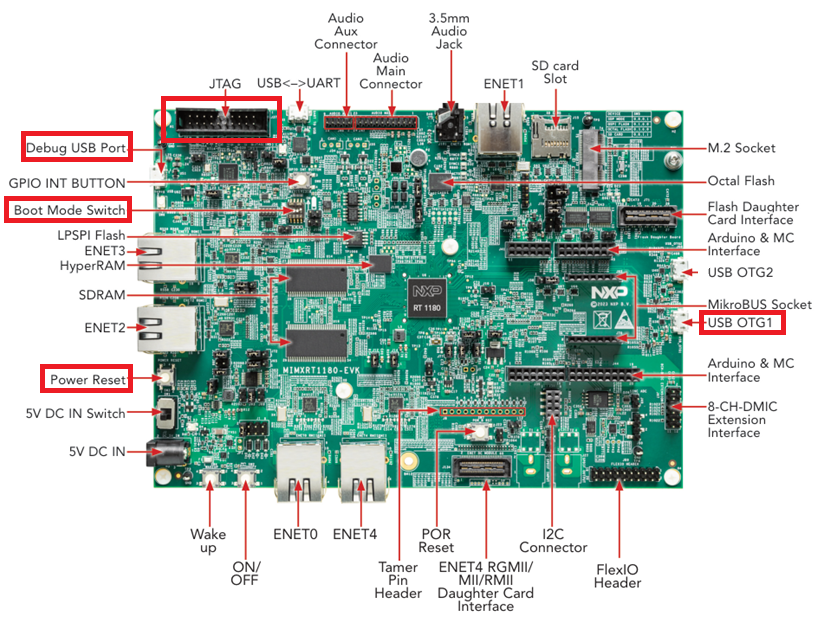
The following picture describes connector placement of RT1180 EVK.
The Enablement process could be split into following steps:
1. Generate Keys#
The AHAB is using asymmetric algorithm for image authentication which requires keys generated according to PKI for operation. One of the generated private key must be also used to sing Debug Credential file. Another key pair which must be generated for this example is Debug credential keys (DCKPriv/Pub). The example uses pre-generated ECC-256 SRK and DCK keys. To generate your own keys please refer to How-to-get-keys-using-nxpcrypto example.
2. The template file must be updated to implement desired functionality and add reference to specific keys.#
# Generate template
%! nxpdebugmbox get-template -f rt118x --force -o $DBGMAILBOX_TEMPLATE
nxpdebugmbox get-template -f rt118x --force -o workspace/nxpdebugmbox_template.yaml
The configuration template file has been created: workspace/nxpdebugmbox_template.yaml
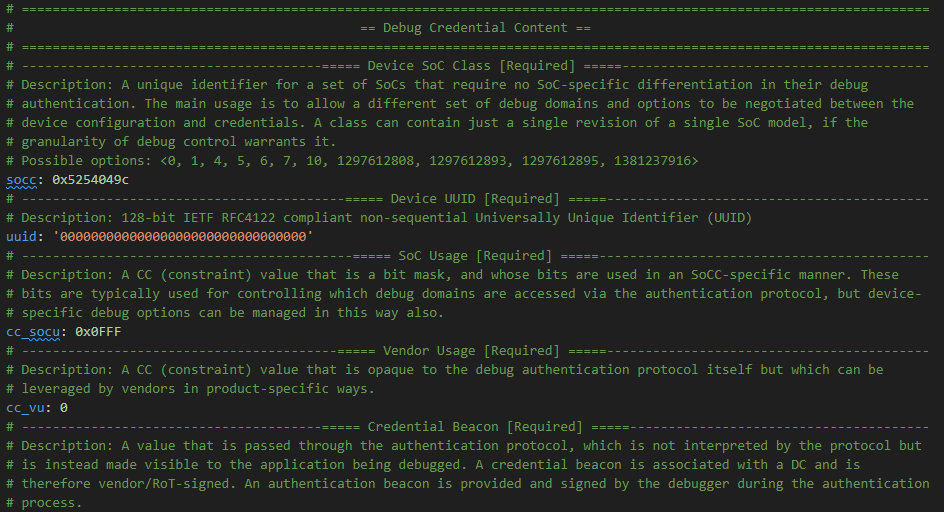
This yaml file must be used to generate Debug Credential file. The OEM is must do it as posses the RoT private keys. Field technician must provide his DCK public key to OEM. The resulting yaml file is available in the “inputs” folder. The figures below illustrates which entries were changed.
I. The template file uses zeroized UUID. To create a debug credential file for specific par run the “get-uuid” command listed below and replace to zeros at the UUID field by the UUID value returned by the command in the yaml file. Vendor usage and cc beacon is not demonstrated in this example.
Connect J-link probe into the connector. To read UUID the following command has to be activated (# must be removed).
# Check the nxp debug mailbox tool
# %! nxpdebugmbox -i $DEBUGGER_PROBE get-uuid
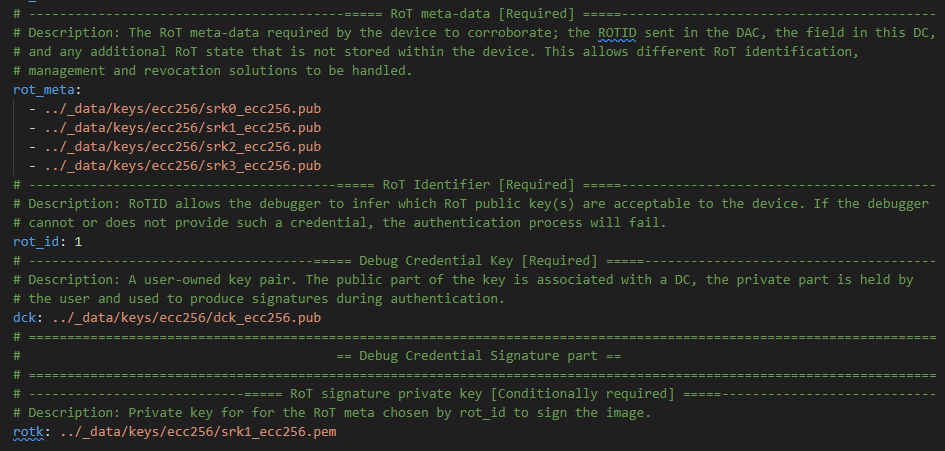
II. Keys must be modified in the file. This example uses pregenerated keys. To Generate custom key, please refer to the example: How-to-get-keys-using-nxpcrypto. Reference to RoT public keys, Signing RoT private key (index 1), and DCK public key must be modified in the template file.
# Create Debug Credential file

# ECDSA-256
PROTOCOL_VERSION = 2.0  # example uses 256 bit keys, thus why protocol version must be 2.0
# ECDSA-384
# PROTOCOL_VERSION = 2.1
# ECDSA-521
# PROTOCOL_VERSION = 2.2

# Debug Credential file as output of
DC_FILE_OUT = WORKSPACE + "rt118x_256.dc"

# Assert os.path.exists(DBGMAILBOX_CONFIG)
assert os.path.isfile(DBGMAILBOX_CONFIG)

%! nxpdebugmbox -i $DEBUGGER_PROBE -v -p $PROTOCOL_VERSION gendc -c $DBGMAILBOX_CONFIG -o $DC_FILE_OUT --force

# Assert os.path.exists(DC_FILE_OUT)
assert os.path.isfile(DC_FILE_OUT)

# Assert os.path.exists(DCK_KEY_PRIV)
assert os.path.isfile(DCK_KEY_PRIV)

# Unlock the Debug Authentication
%! nxpdebugmbox -i $DEBUGGER_PROBE -v -p $PROTOCOL_VERSION auth -b 0 -c $DC_FILE_OUT -k $DCK_KEY_PRIV
nxpdebugmbox -i jlink -v -p 2.0 gendc -c inputs/nxpdebugmbox_rt118x.yaml -o workspace/rt118x_256.dc --force
INFO:spsdk.apps.nxpdebugmbox:Loading configuration from yml file...
INFO:spsdk.apps.nxpdebugmbox:Creating ECC debug credential object...
WARNING:spsdk.dat.debug_credential:Running loading of debug credential configuration file on backward compatibility mode. Please update your configurationfile to use family/revision of chip instead of using SOCC value. Used SOCC (0x5254049C) has been converted to chip ambassador  family 'rt118x' (1181ms since start, debug_credential.py:283)
RKTH: cb2cc774b2dcec92c840eca0646b78f8d3661d3a43ed265a490a13aca75e190a
INFO:spsdk.apps.nxpdebugmbox:Saving the debug credential to a file: workspace/rt118x_256.dc
Creating Debug credential file succeeded
nxpdebugmbox -i jlink -v -p 2.0 auth -b 0 -c workspace/rt118x_256.dc -k ../_data/keys/ecc256/dck_ecc256.pem
INFO:spsdk.apps.nxpdebugmbox:Starting Debug Authentication
  #   Interface   Id         Description
--------------------------------------------
  0   Jlink       59305729   Segger J-Link
INFO:spsdk.apps.nxpdebugmbox:DAC:
Version                : 2.0
SOCC                   : 0x5254049C
UUID                   : 08C1DE634A024663BEBA1DED9C5CA919
CC_VU                  : 0
ROTID_rkh_revocation   : 00000000
ROTID_rkth_hash        : cb2cc774b2dcec92c840eca0646b78f8d3661d3a43ed265a490a13aca75e190a
CC_soc_pinned          : 00FFFFF0
CC_soc_default         : 00000000
Challenge              : 8905366ca83e21eee681c3b2bb84b0924222801030d4f85cc55c369853bfc072

INFO:spsdk.apps.nxpdebugmbox:DAR:
DAC:
Version                : 2.0
SOCC                   : 0x5254049C
UUID                   : 08C1DE634A024663BEBA1DED9C5CA919
CC_VU                  : 0
ROTID_rkh_revocation   : 00000000
ROTID_rkth_hash        : cb2cc774b2dcec92c840eca0646b78f8d3661d3a43ed265a490a13aca75e190a
CC_soc_pinned          : 00FFFFF0
CC_soc_default         : 00000000
Challenge              : 8905366ca83e21eee681c3b2bb84b0924222801030d4f85cc55c369853bfc072

DC:
Version : 2.0
SOCC    : 0x5254049C: rt118x[a0,b0]
UUID    : 00000000000000000000000000000000
CC_SOCC : 0xfffff0
CC_VU   : 0x0
BEACON  : 0
SRK table has 4 entries
SRK Hash: cb2cc774b2dcec92c840eca0646b78f8d3661d3a43ed265a490a13aca75e190a
Authentication Beacon: 0

Debug Authentication ends successfully.
# Test if debug access works
# Do not call if you want to debeg in IDE
%! nxpdebugmbox -i $DEBUGGER_PROBE test-connection
nxpdebugmbox -i jlink test-connection
  #   Interface   Id         Description
--------------------------------------------
  0   Jlink       59305729   Segger J-Link
The device is accessible for debugging.